
Introduction
From release 3.47, the new IVR object LLM Bot can be used to send caller or IVR input to a configured Chat Connector chatbot or RAG endpoint.
The object simplifies chatbot integration in routing applications by providing a dedicated configuration instead of requiring manual low-level request handling.
LLM Bot Object
The LLM Bot object is available in the routing application editor and can be used wherever information should be sent to a configured chatbot or RAG endpoint.
Example of the LLM Bot object in a routing application.
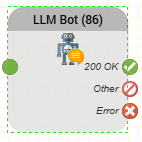
The object provides the following configuration options:
- Chat Connectors
- Sender
- Message
- Timeout (seconds)
- Variable Prefix Result
Configuration
Chat Connectors
The Chat Connectors field specifies the configured Chat Connector which should process the request.
The selected Chat Connector provides the chatbot or RAG endpoint configuration.
Sender
The Sender field identifies the sender of the request.
The value can contain variables from the routing application as required.
Message
The Message field contains the text which is sent to the selected Chat Connector.
The message can contain caller input, IVR-generated content or variables available within the routing application.
Timeout
The Timeout (seconds) field specifies how long the routing application waits for the Chat Connector request to complete.
Variable Prefix Result
The Variable Prefix Result field specifies the prefix used for the result variables returned by the object.
This allows the returned data to be stored using a defined variable prefix and referenced by subsequent objects in the routing application.
Outputs
The LLM Bot object provides three outputs:
- OK - The request was executed successfully.
- Other - The request completed, but returned a non-success response.
- Error - The request could not be executed or a technical error occurred.
The outputs can be connected to different paths in the routing application depending on how successful responses, non-success responses and technical errors should be handled.