
FROM RELEASE 3.47
Function
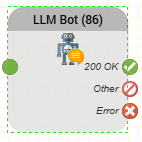
The LLM Bot object can be used to send caller or IVR input to a configured Chat Connector chatbot or RAG endpoint.
The object simplifies chatbot integration in voicebot routing applications by providing a dedicated configuration instead of requiring manual low-level REST API request handling.
Parameters
| Parameter | Description |
|---|---|
| Chat Connectors | Specifies the Chat Connector that processes the request. The selected Chat Connector provides the chatbot or RAG endpoint configuration. |
| Sender | Identifies the sender of the request. The value can contain variables from the routing application. |
| Message | Text sent to the selected Chat Connector. Can contain caller input, IVR-generated content, or routing application variables. |
| Timeout | Specifies how long the routing application waits for the Chat Connector request to complete. |
| Variable Prefix Result | Specifies the prefix for the result variables returned by the object. These variables can be referenced by subsequent objects in the routing application. |
Outputs
| Output | Used when ... |
|---|---|
| OK | The request was executed successfully. |
| Other | The request completed, but returned a non-success response. |
| Error | The request could not be executed or a technical error occurred. |
FROM RELEASE 3.48
Waiting Audio
The Enable Waiting Audio option allows a short message to be played to the caller while waiting for the LLM response.
When enabled, audio playback starts before the Chat Connector request is executed. The audio and the HTTP request are processed in parallel.
Waiting Audio supports two playback methods:
Text to Speech (TTS): Plays a message using a configured TTS engine.
Voice Prompt: Plays an existing voice prompt from the system.
Waiting Audio Parameters
| Parameter | Description |
|---|---|
| Enable Waiting Audio | Enables or disables waiting audio. Default: false. |
| Voice Prompt or TTS | Selects the waiting-audio playback method. |
| Engine | TTS engine used when Text to Speech is selected. |
| Prompt Text | Text to be spoken by the selected TTS engine. |
| Voice Prompt Type | Selects the category of available voice prompts. |
| Voice Prompt | Existing voice prompt to play while waiting for the response. |
The TTS parameters are relevant when Text to Speech is selected. The voice-prompt parameters are relevant when Voice Prompt is selected.
Execution Behaviour
The LLM Bot prepares the configured waiting audio.
Audio playback starts.
The Chat Connector request is executed while audio is playing.
The object waits for both the HTTP request and waiting-audio playback to finish.
The object continues through the appropriate output.
Important notes:
Waiting audio is played once; it does not automatically repeat until the LLM responds.
If the waiting audio finishes before the LLM response arrives, the caller may hear silence for the remaining processing time.
If the LLM responds before waiting audio finishes, the object waits for playback to complete before continuing.
If the configured waiting audio is unavailable, the object continues without waiting audio.
Waiting Audio does not change the Chat Connector request or the existing result handling.
Waiting Audio is disabled by default (
false). Existing routing applications do not require any changes and continue to work as before.
Example
A caller asks:
„Ich möchte ein Ticket erstellen.“
If Waiting Audio is enabled, the bot can play:
„Einen Moment bitte.“
While this announcement plays, the LLM Bot sends the caller's request to the configured Chat Connector.
Once both the request and waiting-audio playback have finished, the routing application continues using the returned result.
This helps reduce perceived waiting time during LLM processing without changing the existing routing logic.