
Containers are a way to package an application together with everything it needs to run (runtime, libraries, system tools, config), and execute it in an isolated environment on a shared operating system kernel.
Unlike a virtual machine, a container does not include a full operating system. It runs as a normal process on the host, isolated from the host and the other containers, sharing the single OS kernel from the host.
Old School Approach
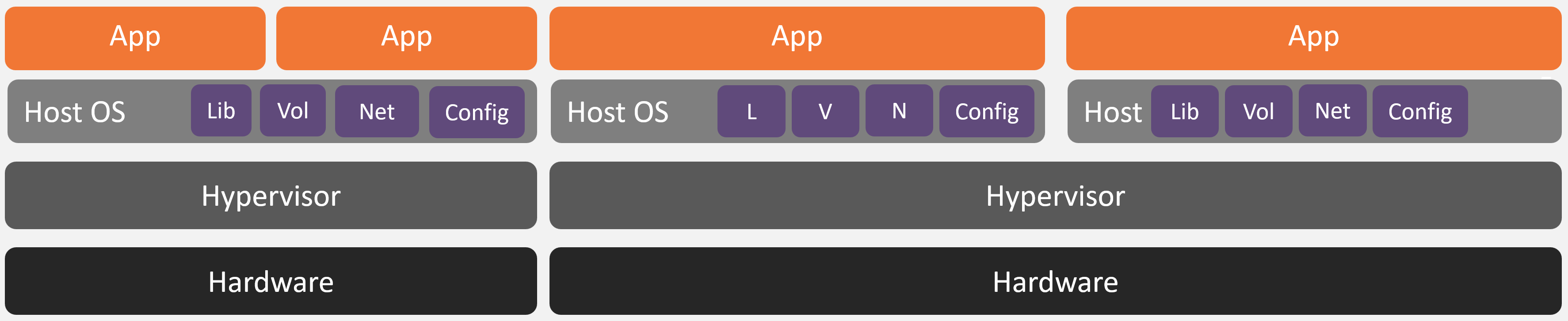
Disadvantages:
- High resource overhead
- Slow startup
- DevOps nightmare (installing / patching / maintaining many OS and applications)
- Murky Devs and DevOps boundaries - "Works on my machine" problem
Container Approach
The main difference between container deployments seen in the industry is the orchestration (i.e. what is responsible for starting and stopping the containers amongst other tasks). The jtel container stack uses docker compose.
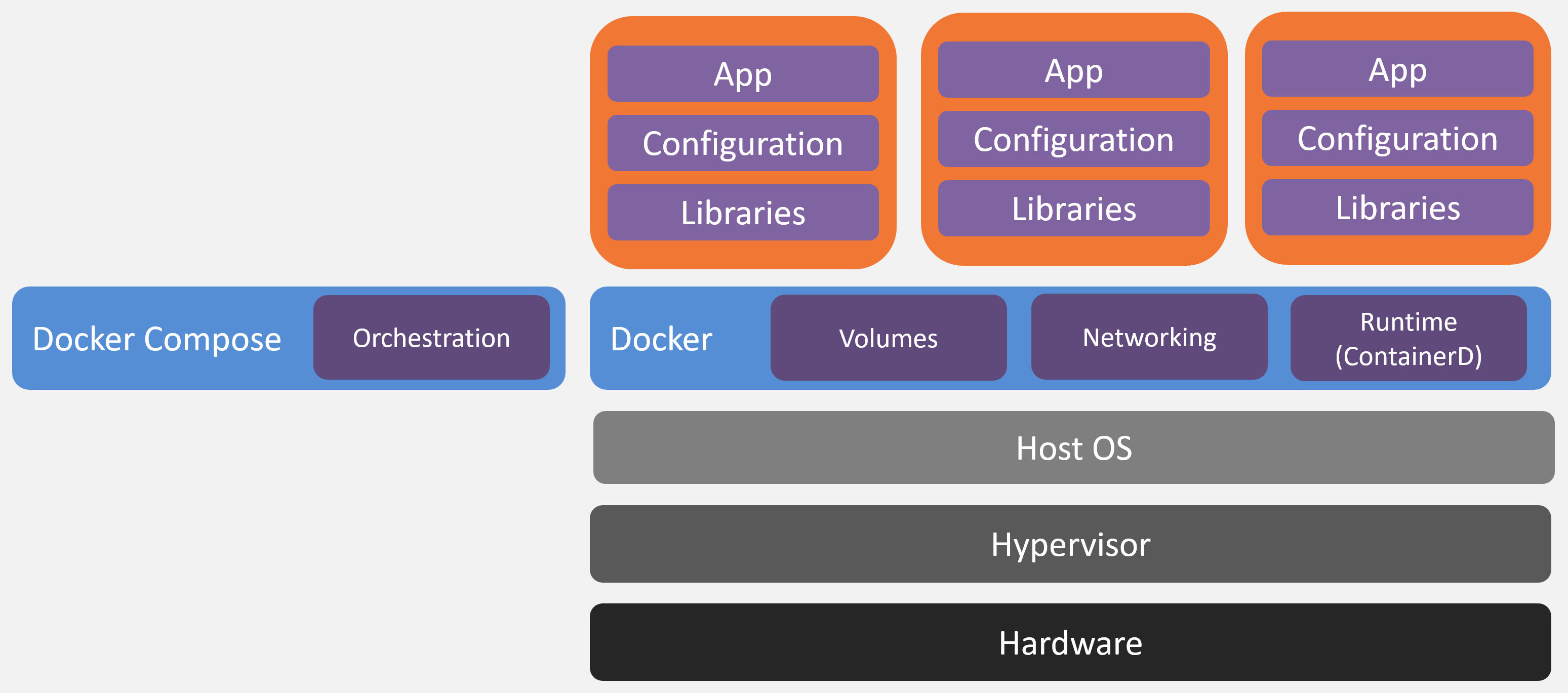
Advantages:
- Lightweight - low resource overhead
- Much higher density per host
- Fast startup in seconds or less
- DevOps greatly simplified - the same container runs on a dev laptop or in production reducing environment specific bugs
- Clean Devs / DevOps Boundary
One Process for all Scenarios
Our container stack uses the same process for all possible scenarios:
- A new vanilla (empty) installation
- Migrating from an existing old school installation to a container installation
- Migrating from one container stack to another stack hosted somewhere else
- Change IaaS providers
- Out of place updates
- Disaster recovery from the nightly backup
This means, that we effectively test disaster recovery every time a stack is deployed or updated.
Involved Repositories and Storage
There are four main repositories and storages involved in the jtel Stack Container deployment process:
- jtel Docker Repo
- jtel Customer Repo
- jtel Customer WORM Storage
- jtel WORM Storage
jtel Docker Repo
This is the jtel repository in which all container images are stored. Container images are tagged every time a version is produced, for example:
- 3.43.1 - main version, first release
- 3.43.2 - main version, first patch release
jtel Customer Repo
This is a customer (jtel container stack instance) specific repository which contains:
- The exact configuration for the customer
- What exact version is used (main release and patch tag)
- Which containers are activated
- What is the sizing of the stack (Small / Medium / Large)
- DNS names
- Container host specific configuration
- Whenever a change is made for the customer, it is documented in this repo for future reference
jtel Customer WORM Storage
The system makes a backup to WORM storage (Write Once Read Many times) which is hosted by jtel in Azure (Geo Location: Germany West) once a day.
The backup is a content based backup which allows for re-creation of the same container stack on any suitable host.
The retention policies ensure that:
- The storage account cannot be deleted, even by global jtel admins for 180 days
- The backups are immutable and therefore cannot be encrypted
For initial setup, a vanilla backup provided from the jtel WORM Storage is used.
jtel WORM Storage
This immutable storage contains version specific files and data stored for specific releases. These files are required and copied to the customer specific storage when an initial (empty) installation is made or when an update to a new release is performed.