| Sv translation | |||||||||||||||||||||||||||||||||||||||
|---|---|---|---|---|---|---|---|---|---|---|---|---|---|---|---|---|---|---|---|---|---|---|---|---|---|---|---|---|---|---|---|---|---|---|---|---|---|---|---|
| |||||||||||||||||||||||||||||||||||||||
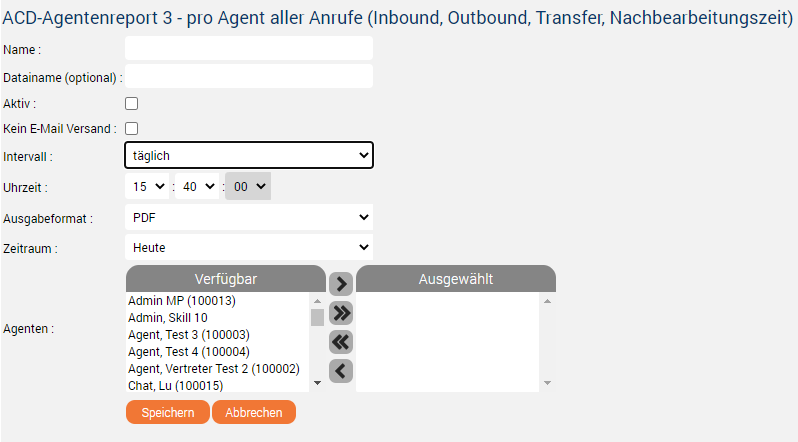
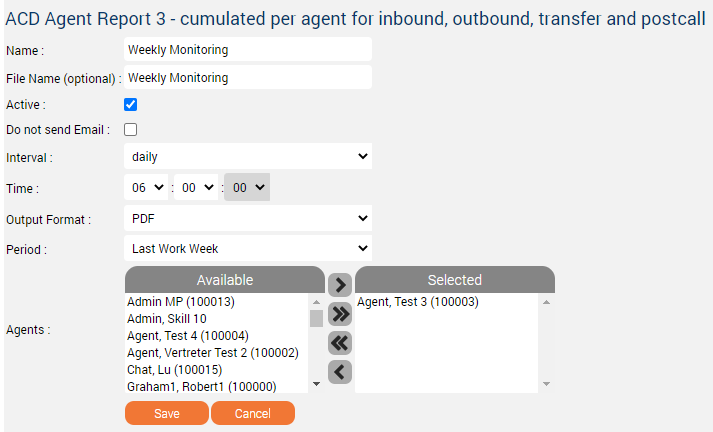
IntroductionThe statistics report subscriptions feature is used to subscribe to a specific report so that the system will execute and push this automatically to your e-mail according to a defined period. Case ExampleLet's assume you are the supervisor of a call center and you want to monitor the performance of the agent name "Agent, Test 3 (100003)" weekly on Monday at 06:00 am, in PDF format. But you don't want to do it manually each Friday for example or you don't want to miss a monitoring day. You can process as follow: ConfigurationPage: Statistics - Reports
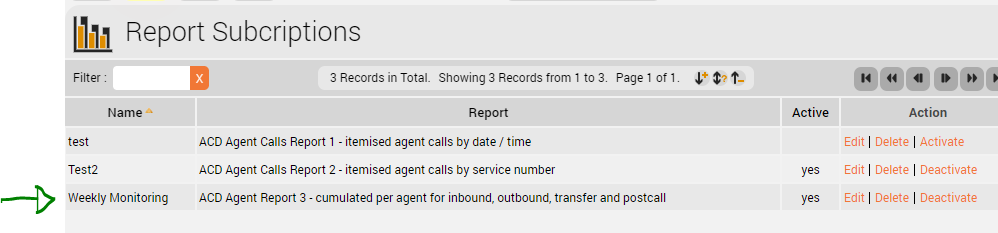
Page: Statistics - Report Subscriptions
Yeah! The subscription job is listed in the pipeline, ready to be generated and pushed to your e-mail - in case your e-mail address is correctly configured in your
|

| Sv translation | |||||||||||||||||||||||||||||||||||||||||||||||||||||||||
|---|---|---|---|---|---|---|---|---|---|---|---|---|---|---|---|---|---|---|---|---|---|---|---|---|---|---|---|---|---|---|---|---|---|---|---|---|---|---|---|---|---|---|---|---|---|---|---|---|---|---|---|---|---|---|---|---|---|
| |||||||||||||||||||||||||||||||||||||||||||||||||||||||||
EinführungDie Funktion zum Abonnieren von Statistikberichten dient dazu, einen bestimmten Bericht zu abonnieren, so dass das System diesen automatisch ausführt und nach einem festgelegten Zeitraum an Ihre E-Mail sendet. FallbeispielNehmen wir an, Sie sind der Leiter eines Call-Centers und möchten die Leistung des Agenten "Agent, Test 3 (100003)" wöchentlich am Montag um 06:00 Uhr morgens im PDF-Format überwachen. Sie möchten dies aber nicht z.B. jeden Freitag manuell durchführen oder Sie möchten keinen Überwachungstag verpassen. Sie können wie folgt vorgehen: KonfigurationSeite: Statistik - Berichte
Zeitraum | report generation and push time. |
Output format | the drop-down list of desired output formats. The formats
Periodicity in which the system will generate and/or push the report to your e-mail address. | Agents | available agents (left) and selected agents (right). Elements of the list right are those who will be taken into consideration in the output report. > move the selected available agent(s) to the list right. >> move all available agent(s) to the list right. >> move back all selected agent(s) to the list left. > move back the selected agent(s) to the list left. Cancel | Click "Cancel" to discard your changes. | Save | Click "Save" to save your subscription into the list of Report Subscriptions. | Page: Statistics - Report Subscriptions
Yeah! The subscription job is listed in the pipeline, ready to be generated and pushed to your e-mail - in case your e-mail address is correctly configured in your
Seite: Statistik - Abbonierte Berichte
Ja! Der Abonnementauftrag ist in der Pipeline aufgelistet, kann generiert und an Ihre E-Mail gesendet werden. - für den Fall, dass Ihre E-Mail-Adresse auf Ihrer Seite
|