
In order to fully use the jtel VoiceBot module (licensed application) and its workflow objects within the IVR routing application it is necessary to activate the client specific Azure Speech Services.
VoiceBot module customers:
- automatically get access to the jtel Cloud TTS Service included
- this means those customers do not have to use Azure Live TTS for all prompts in a VoiceBot
- this in turn
o saves costs for the customer on the Azure Speech Service side.
o makes building VoiceBots and IVRs a little easier - as you can operate the texts (TTS) in the audio prompts with the TTS - without having to edit the IVR routing application.
Azure Speech Service configuration
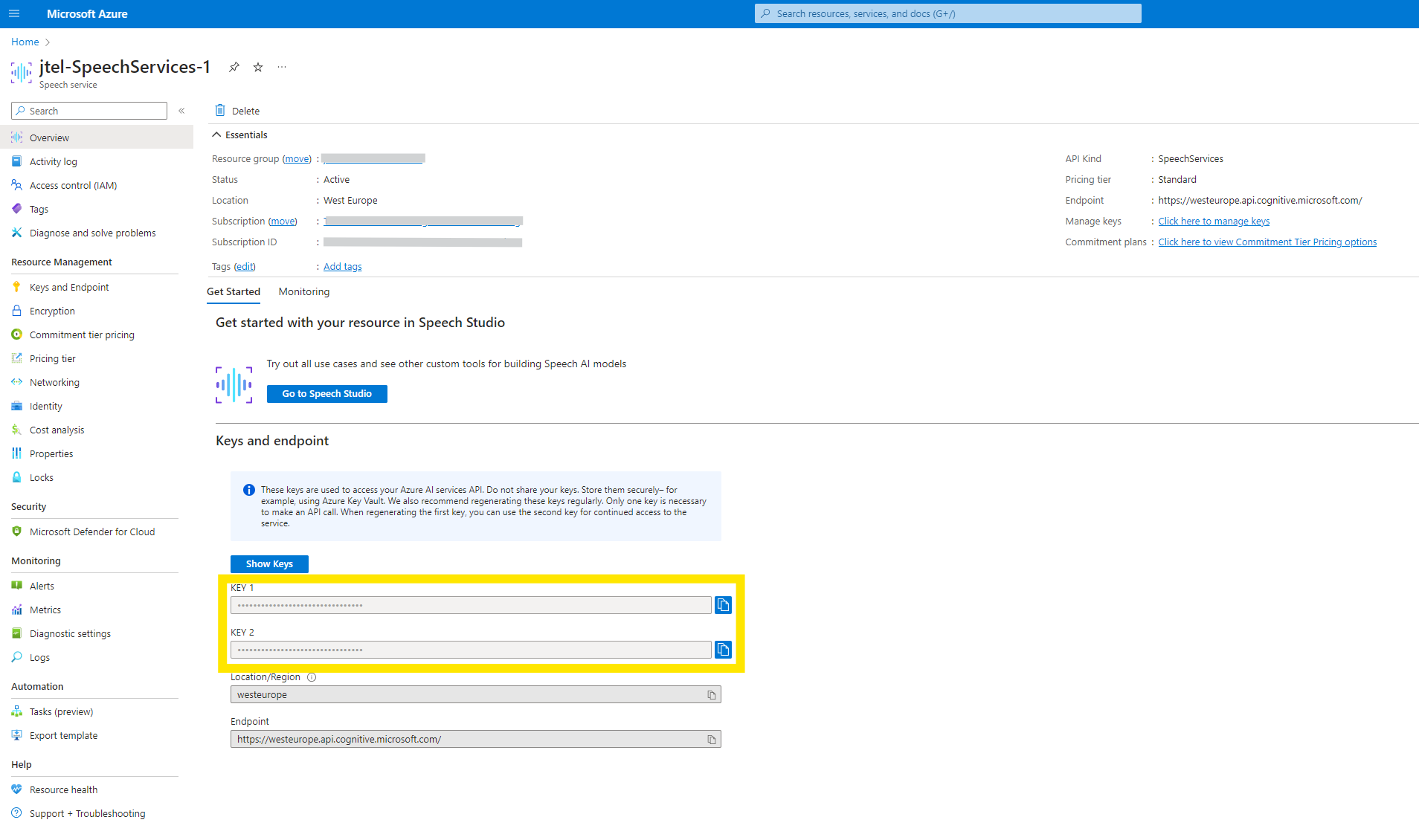
The jtel VoiceBot module requires from the customer the following client specific data. This is then implemented into the jtel portal client parameters → Clients Parameters
- Azure.SpeechServices.APIKey
- Azure.SpeechServices.EndPoint
- Azure.SpeechServices.Region
From release 3.47, Azure Speech Services can also be used through a private/custom endpoint for both ASR and TTS.
For private endpoint operation, configure:
Azure.SpeechServices.Region = private
Azure.SpeechServices.EndPoint = wss://<speech-resource>.cognitiveservices.azure.com
When Azure.SpeechServices.Region contains a normal Azure region, the existing public Azure Speech Services configuration is used.
Existing public Azure configurations do not require any changes.
This data is received by configuring the Azure Speech Service. During the Azure Speech Service activation process these are the parameters asked for:
- API Kind : SpeechServices
- Pricing tier : S0 Standard (as minimum) - optional commitment tier pricing
- Allow access from all networks (default, this will definitely work with jtel, but can be restricted to the physical Network the jtel portal (Webservers) are located.
- System assigned Identity : off (default, optional)
- User assigned Identity : none (default, optional)
- Endpoint : https://westeurope.api.cognitive.microsoft.com/ (to be adjusted to the required region)
- Location : West Europe (to be adjusted to the required region)
- Encryption type : Microsoft Managed Keys