
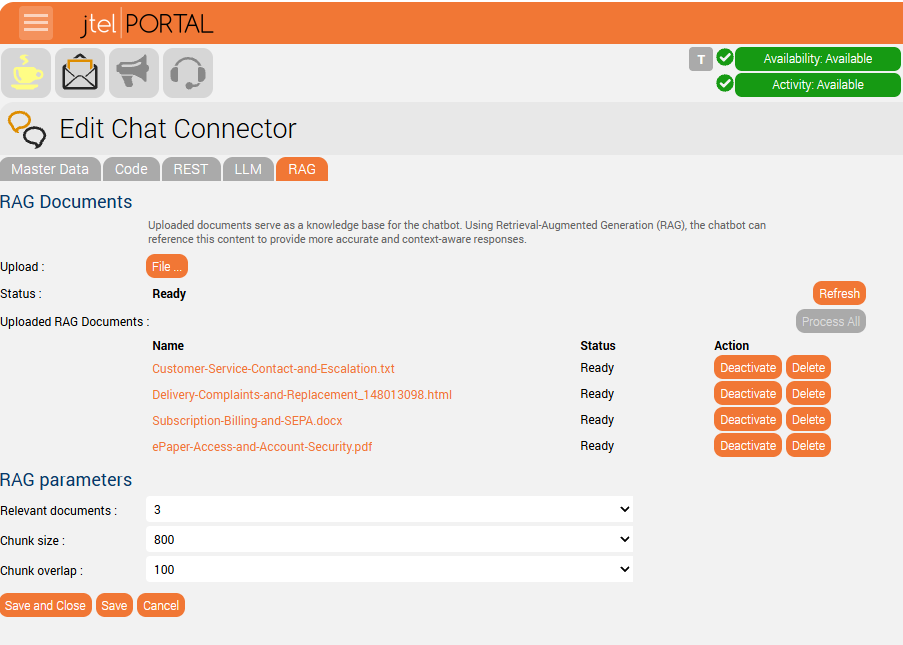
RAG allows the chatbot to answer questions using information from uploaded documents.
When a user asks a question, the system retrieves potentially relevant passages, reranks them, and provides the best results to the LLM as additional knowledge. retrieval
RAG Bot
The RAG Bot tab is used to manage the knowledge base.
You can:
- Upload documents
- Process individual documents
- Process all documents
- Delete documents
- Deactivate documents
- View the processing status
Supported formats include:
.txt
.md
.pdf
.docx
.html
.htm
Documents are converted into structured text while preserving useful information such as titles, headings, lists, tables and links. html_to_text
Document Processing
After uploading a document, it must be processed before it becomes available to the chatbot.
Typical document states are:
| Status | Meaning |
|---|---|
| Ready | Document is processed and up to date |
| Not Processed | Document has not yet been processed |
| Outdated | Document or RAG configuration changed |
| Processing | Processing is currently running |
| Error | Processing failed |
Use Process to update one document.
Use Process All to rebuild the complete knowledge base. A new vector database is created and activated only after processing completes successfully. rag_service
Structure-Aware Chunking
Documents are no longer simply divided into fixed-size blocks.
The processor first detects the document structure:
Title

Section 1
Content...

Section 2
Content...
A complete section remains together when possible. Only sections that exceed the configured Chunk Size are split, while keeping heading context and overlap. build_vector_db
This generally produces more meaningful RAG passages.
RAG Parameters
Relevant Documents
Defines the maximum number of passages supplied to the LLM.
Recommended starting value: 3
The system may retrieve more candidates internally and rerank them before selecting the final passages. retrieval
Chunk Size
Maximum target size for a RAG passage.
Recommended starting value: 800
A section smaller than this remains intact.
Chunk Overlap
Content repeated when a large section must be split.
Recommended starting value: 100
A typical starting configuration is therefore:
| Parameter | Value |
|---|---|
| Relevant Documents | 3 |
| Chunk Size | 800 |
| Chunk Overlap | 100 |
Writing Good RAG Documents
Document structure directly affects retrieval quality.
Use a clear title
Good:
Customer Service - Delivery Complaints
Avoid generic names such as:
Document 1
Use headings for topics
Recommended:
# Delivery and Complaints

## Missing Delivery

Information about missing deliveries...

## Damaged Newspaper

Information about damaged newspapers...
The RAG processor uses headings to create semantic sections. build_vector_db
FAQ Documents
For FAQ documents, use each question as a heading:
# Frequently Asked Questions

## Do my existing contracts remain valid?

Yes. Existing contracts remain valid...

## Do I need to change my bank details?

No. Existing direct debit mandates...
This keeps each question and answer together as one meaningful section.
Word Documents
For DOCX files, use Word's built-in styles where possible:
Title
Heading 1
Heading 2
Heading 3
The processor can also recognize some common structures such as bold numbered questions, but proper Heading styles are preferred. ingest_documents
Keep Related Information Together
Place all information belonging to a topic under the same heading.
Use lists and tables where they make the information clearer.
Avoid unnecessary content such as:
- Draft notes
- Internal comments
- Obsolete information
- Repeated headers and footers
- Large unrelated sections
Focused documents usually work better than one very large document containing unrelated topics.
Source Links
Document URL Prefix and Document Title Prefix are no longer required.
If source links are needed, define the rule directly in the bot prompt.
Example for Confluence exports:
Source links:
- All retrieved documents are Confluence exports whose filename ends with the page ID.
- When using information from a retrieved document, add:
  https://wiki.jtel.de/pages/viewpage.action?pageId=<pageId>
- Do not invent a link if no page ID can be determined from the filename.
The RAG context contains the document title, filename, section and content, so source-specific links can be derived when required. retrieval
Recommended Prompt Rules
For a knowledge-based bot, include rules such as:
- Use the retrieved knowledge as the source for company-specific information.
- Answer only when the retrieved knowledge supports the answer.
- Do not invent information.
- If the knowledge does not contain the answer, say that the information is not available.
- Do not mention internal chunk numbers, filenames or retrieval metadata.
Main Changes
The updated RAG implementation includes:
- Improved retrieval with reranking
- Structure-aware chunking
- Markdown support
- Improved HTML and DOCX processing
- Preservation of headings, lists, tables and links
- Per-document processing and status
- Process All for complete rebuilds
- Removed Vectorize / Force Vectorization controls
- Removed Document URL Prefix / Document Title Prefix
- Source-link rules can be defined directly in the prompt
This is about the length I would use for the actual Wiki page.