
Overview
The Live Agent feature in jtel Portal makes call handling better by using AI to transcribe live calls, extract important information, analyze sentiment* and provide real-time help to agents. This feature helps supervisors and agents to deal with conversations more efficiently by using AI.
Features
Live Transcription
Real-time transcription of ongoing calls using supported ASR (Automatic Speech Recognition) speech to text (STT) engines.
Displayed directly in Agent Home and Supervisor for both agents and supervisors.
AI-Powered Assistance
A chain of AI modules can be attached to the transcription process, offering:
Entity Extraction: Identifies useful data such as:
Automatic CRM or ticket system link generation based on customer or ticket numbers.
Suggested transaction codes related to the call.
Summary extraction at the end of the call.
- Transaction Code Suggestions: based on the conversation context.
- The AI can detect relevant transaction codes during the call.
- Suggested transaction codes are displayed to the agent in real-time.
- Sentiment Analysis*: Detects emotions in conversations, displaying icons for happy, neutral, or angry tones.
AI Pipeline Integration: Supports multiple AI models, including:
Microsoft Copilot
Existing chatbots
Custom AI solutions with REST API support.
Parallel AI Processing: Multiple AIs can process data simultaneously without delays.
Supervisor Features
Supervisors can view live transcriptions.
Ability to send hints or comments to agents in real time.
Data Storage & Retrieval
Transcriptions and AI-generated results are stored in the database for future reference.
Can be accessed in reports and statistical overviews.
Configuration
Resource Activation
Ensure the following resources are allowed (Sysadmin - Resources)
portal.Acd.AcdSupervisor.LiveAgent
portal.Acd.AgentHome.LiveAgent
They Can be assigned per role (Client Admin / Client User).
AI Service Rendering Control
It is possible to control the rendering (visibility) of individual Live Agent AI services via dedicated resources.
Each AI feature (Transcription, Assistant, Sentiment, Suggestions, etc.) has a separate permission resource.
| Resource | Description |
|---|---|
| Renders the AI Transcription section. |
portal.AgentHome.LiveAgent.AI.Assistant | Renders the AI Assistant services (Suggestions, Summary, Sentiment). |
portal.Acd.AgentHome.LiveAgent.AI.Assistant.Caller | Renders the caller's sentiment analysis. |
portal.Acd.AgentHome.LiveAgent.AI.Assistant.Agent | Renders the agent's sentiment analysis. |
portal.Acd.AgentHome.LiveAgent.AI.Assistant.Sugesstion | Renders the AI Suggestion section. |
portal.Acd.AgentHome.LiveAgent.AI.Assistant.Summary | Renders the AI Summary section. |
portal.Acd.AgentHome.LiveAgent.AI.Assistant.Satisfaction | Renders the AI Satisfaction section. |
portal.Acd.AgentHome.LiveAgent.AI.Assistant.TAC | Renders the AI Transaction Code section. |
Client Master Data - Parameters
In Client Master Data - Parameters. set AI Pipeline Configuration, After Call Pipeline Configuration and Transcription Provider
| Name | Value |
|---|---|
LiveAgent.AIPipeline.EndPoint | http://<server>:<port>/api/v1/aipipeline |
LiveAgent.AIPipeline.Input | { "endpoints": [ { "type": "suggestions", "url": "http://<server>:<port>/webhooks/rest/webhook", "input": { "sender": "%Service.StatisticsPartAID_%", "message": "$ai_pipeline_input" } }, { "type": "sentiment", "url": "http://<server>:<port>/api/v1/sentiment", "input": { "data": "$ai_pipeline_input" } } ]} |
LiveAgent.AfterCallPipeline.EndPoint | http://<server>:<port>/api/v1/aftercall |
LiveAgent.AfterCallPipeline.Input | { "endpoints" : [ { "type" : "summary", "url" : "http://<server>:<port>/api/v1/summary", "input" : $ai_pipeline_input } ], "respondTo" : { "host" : "%SERVER_IP_UDP_ADDRESS%", "port" : %ACD.UDP.Webserver.Port%, "message" : "NONCALL;AI_AFTERCALL_PIPELINE_RESULT;%QueueCheck.AgentDataID%;%Service.StatisticsPartAID_%;AI_PIPELINE_OUTPUT=$ai_pipeline_output" }} |
| # Instructions
|
| # Instructions
|
| # Instructions
|
| # Instructions
|
LiveAgent.Transcribe.Provider | EnderTuring.v2 (or Azure, Azure.v3, Whisper.v3 ) |
Licensing & Activation
This feature requires special activation by jtel.
Additional licenses may be required.
Contact jtel support for further details.
Example Interface
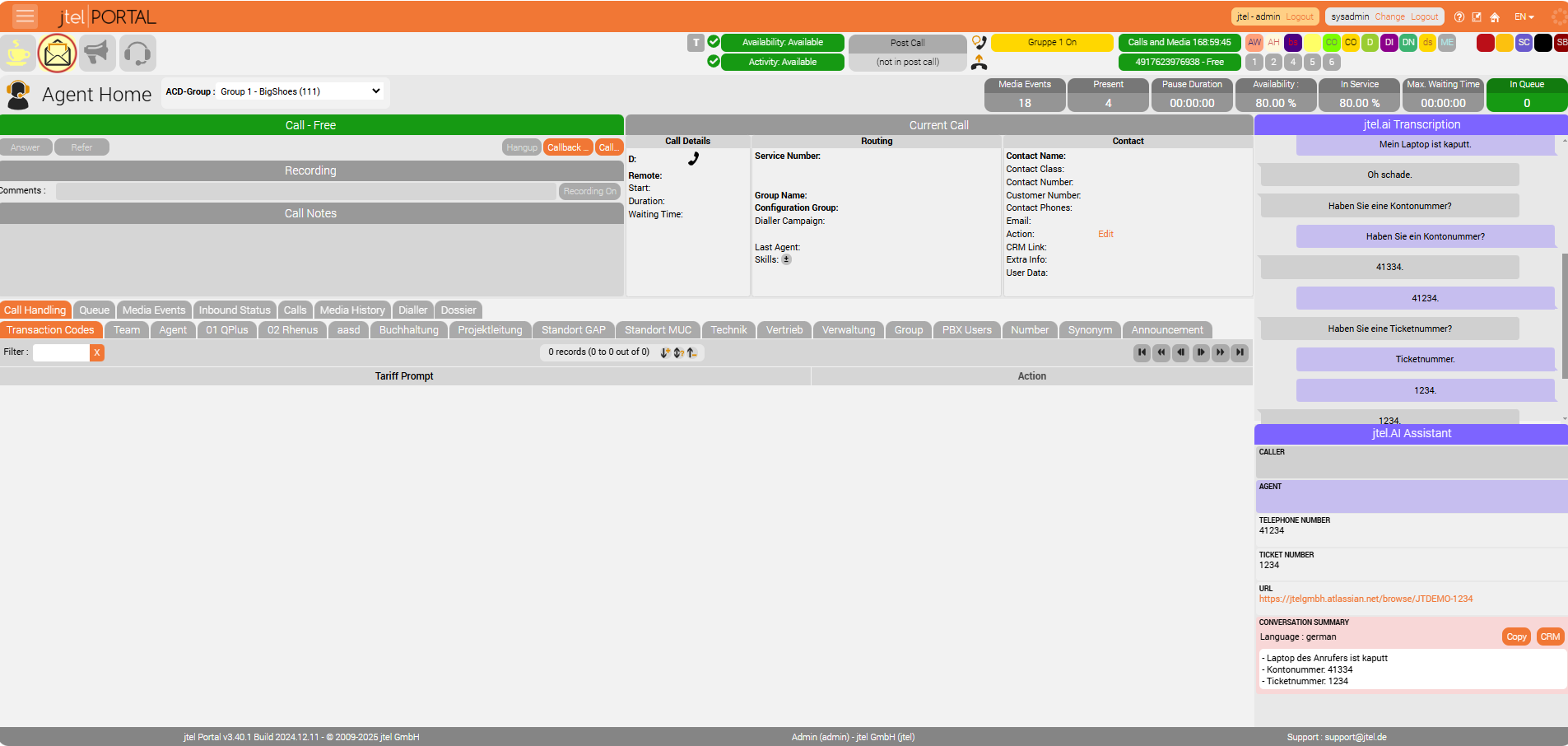
Agent Home View
Refer to the screenshot below for a visual representation of Live Agent in Agent Home.
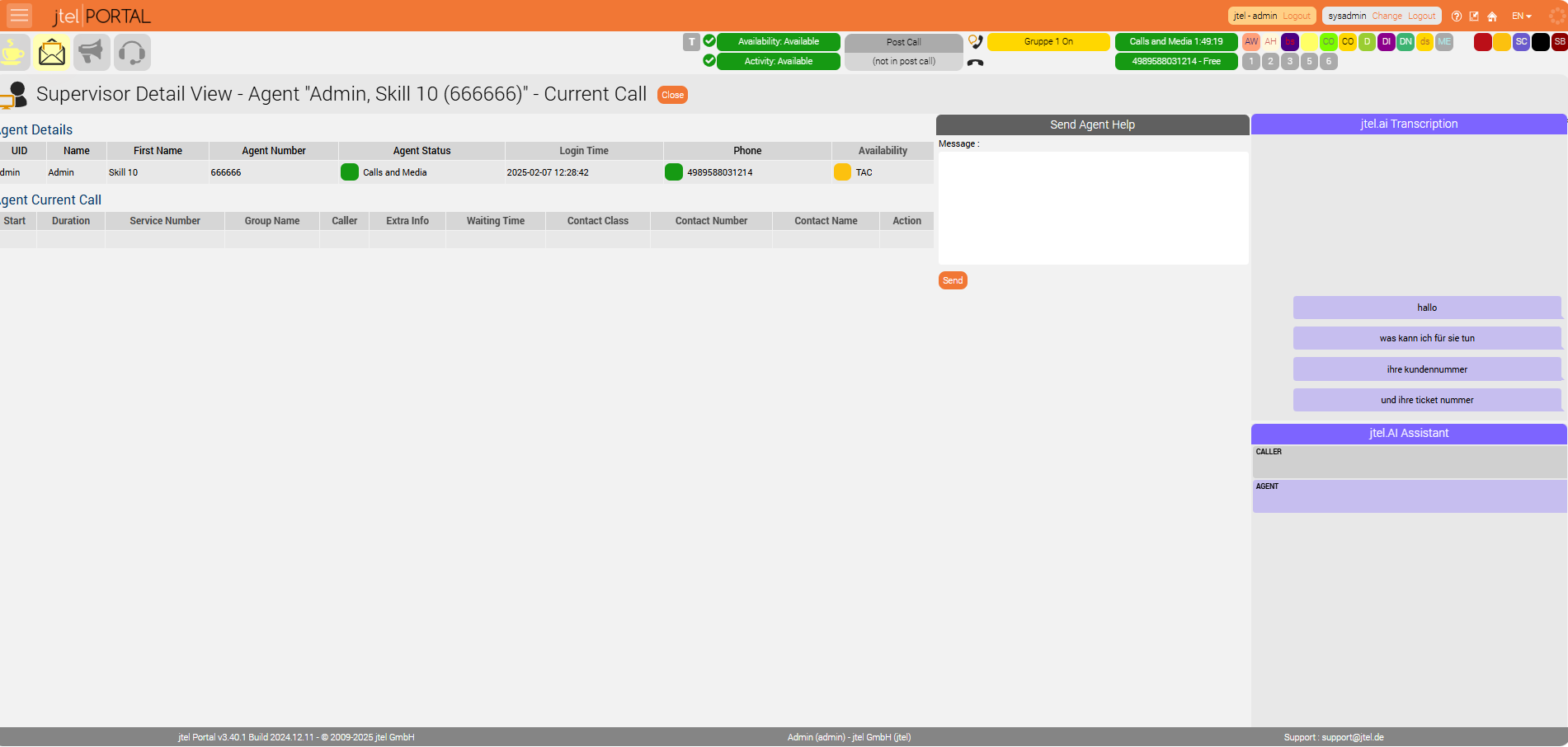
Supervisor Detail View
Supervisors can see the agent’s current call, live transcription, and send direct messages to guide the agent during the call.
*Please note: Sentiment Analysis
The use of sentiment analysis may be legally restricted in your region. This applies particularly to the EU, where it's use is heavily restricted. Please consult your legal advisors before using this, or any AI related feature.
Automatic or Manual CRM Output After Call Completion
FROM RELEASE 3.47
Live Agent after-call AI results can now be passed to a routing application after the call has ended.
The routing application can either be:
Executed automatically after the Live Agent after-call AI processing has completed.
Executed manually by the agent using the CRM button once the after-call AI result is available.
This enables customer-specific post-call processing such as updating CRM data, storing AI-generated results, triggering follow-up actions or continuing additional workflow steps.
Live Agent in the Mini Client
FROM RELEASE 3.47
Live Agent functionality is now also available in the Mini Client.
Agents can access Live Agent information from the new jtel.ai tab, including:
Live transcription
AI suggestions
Agent and caller information
Call summary
Transaction Code suggestions
Customer satisfaction results
Live Agent can be enabled independently for Agent Home and the Mini Client using the corresponding resources / rights.
AI Transaction Code Suggestions
FROM RELEASE 3.47
Live Agent AI Transaction Code suggestions are now integrated with the existing Transaction Code workflow in both Agent Home and the Mini Client.
Transaction Codes suggested by Live Agent are highlighted in the existing Transaction Code popup. If the popup is not opened automatically after the call, the agent can click an AI Transaction Code suggestion to open the Transaction Code popup for the corresponding finished call.
Live Agent does not automatically set or save a Transaction Code. The agent must confirm the Transaction Code using the existing Set / Reset functionality.
Existing Transaction Code rules, including mandatory Transaction Codes and the maximum number of Transaction Codes per call, remain unchanged.
Conversation Logging Control
FROM RELEASE 3.47
Live Agent conversation-related data can now optionally be excluded from the Call Log.
When conversation logging is disabled, Live Agent continues to use ASR, transcription and AI processing normally, but conversation-related data such as transcription results and AI pipeline input containing the conversation is no longer written to the Call Log.
Normal technical Call Log entries remain unchanged.