
FROM RELEASE 3.34
Classic
To create a new Apex class, access Setup in SalesForce, and type in "Apex" in the quick search box.
Select "Build ... Develop ... Apex Classes".
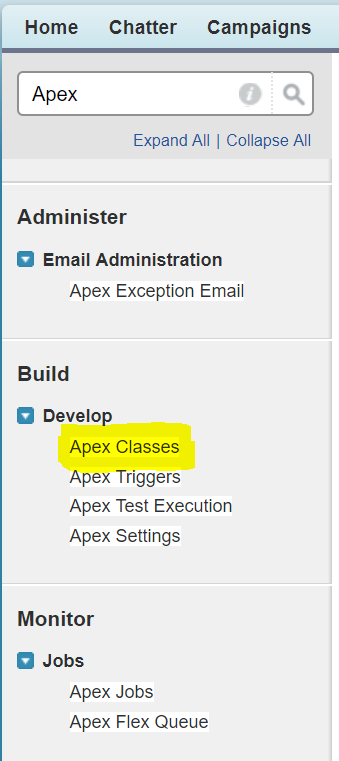
Lightning
Access Setup, and search for "Apex" in the search box.

Classic and Lightning
We provide two examples here.
The first example queries email Task objects from the Salesforce system:
Sample Apex genericQuery
@RestResource(urlMapping='/jtelACD/getEmailTasks')
global with sharing class JTELACD_GetEmailTasks {
    // Class to decode the parameters
    public class GenericQueryParams {
        public String Param1;
        public String Param2;
        public String Param3;
        public String Param4;
        public String Query;
    }

    @HttpPost
    global static void doPost() {
        RestRequest req = RestContext.request;
        RestResponse res = RestContext.response;
        res.addHeader('Content-Type', 'application/json');

        // Deserialize the JSON
        GenericQueryParams genericQueryParams = (GenericQueryParams) System.JSON.deserialize( req.requestBody.toString(), GenericQueryParams.class );

        List<Task> tasks = [
            SELECT FIELDS(STANDARD),
                   TYPEOF Who
                       WHEN Lead THEN FirstName, LastName, Email
                       WHEN Contact THEN FirstName, LastName, Email
                   END
            FROM Task
            WHERE Status = 'Inbound Email'
            WITH USER_MODE
            LIMIT 1
        ];

        if (tasks.size() > 0) {
            res.statusCode = 200;
            res.responseBody = Blob.valueOf(JSON.serialize(tasks[0]));
            return;
        }

        res.statusCode = 404;
        res.responseBody = Blob.valueOf('{"error":"No task found"}');
    }
}
The second example sets Task objects to "In Progress" in Salesforce:
Sample Apex genericQuery
@RestResource(urlMapping='/jtelACD/setEmailTaskStatus')
global with sharing class JTELACD_SetEmailTaskStatus {

    // Class to decode the parameters
    public class GenericQueryParams {
        public String Param1;
        public String Param2;
        public String Param3;
        public String Param4;
        public String Query;
    }

    @HttpPost
    global static void doPost() {

        RestRequest req = RestContext.request;
        RestResponse res = RestContext.response;

        res.addHeader('Content-Type', 'application/json');

        // Deserialize the JSON
        GenericQueryParams genericQueryParams = (GenericQueryParams) JSON.deserialize( req.requestBody.toString(), GenericQueryParams.class );

        if (String.isBlank(genericQueryParams.Param1)) {
            res.statusCode = 400;
            res.responseBody = Blob.valueOf('{"error":"Missing task id"}');
            return;
        }

        if (String.isBlank(genericQueryParams.Param2)) {
            res.statusCode = 400;
            res.responseBody = Blob.valueOf('{"error":"Missing status"}');
            return;
        }

        List<Task> tasks = [
            SELECT FIELDS(STANDARD)
            FROM Task
            WHERE Id = :genericQueryParams.Param1
            LIMIT 1
        ];

        if (tasks.isEmpty()) {
            res.statusCode = 404;
            res.responseBody = Blob.valueOf('{"error":"Task not found"}');
            return;
        }

        Task task = tasks[0];
        task.Status = genericQueryParams.Param2;

        update task;

        res.statusCode = 200;
        res.responseBody = Blob.valueOf(JSON.serialize(task));
    }
}
CURL Test
First of all, obtain an OAUTH Token, see Testing with CURL.
The following CURL command can be used to test this API:
CURL - genericQuery Test
curl --silent -i -X POST -d '{ "Param1" : "Example Param 1", "Param2" : "Example Param 2", "Param3" : "Example Param 3", "Param4" : "Example Param 4", "Query" : "Example Query" }' --header "Content-Type: application/json" --header "Authorization: Bearer <OAUTH_TOKEN>" --header "Connection: Close" "https://<SALES_FORCE_INSTANCE_URL>/services/apexrest/jtelACD/genericQuery"