| Rolle | Prüfe | Kommentar |
|---|
| ALLE LINUX | Betriebszeit und Fehler | Befehle: uptime um zu prüfen, wie lange das System in Betrieb ist. Wenn es neu gestartet wurde, dann prüfen Sie die folgenden Logs: less /var/log/messages Möglicherweise müssen Sie zu einer älteren Datei als der aktuellen Protokolldatei zurückgehen, um zu sehen, warum. |
| ALL LINUX | Festplattenspeicher | Befehle: df -h um sicherzustellen, dass die Festplatte nicht voll ist. Achten Sie besonders bei den Datenbanksystemen darauf, dass dieser Platz nicht bald zur Neige geht. Hinweis: Auf einigen Systemen könnte das Verzeichnis /var/lib/mysql seperat angebunden sein. Verwende: mount um herauszufinden, wo die Anbindung sich befindet, oder cat /etc/fstab |
| ALL LINUX | CPU Auslastung | Verwenden Sie die beiden folgenden Möglichkeiten, um Probleme mit der CPU-Last zu erkennen: top sar (Historisch) sar -u 1 (Echtzeit) |
| ALL LINUX | Zeitsynchronisierung | Use the following commands to make sure the time sync is OKVerwenden Sie die folgenden Befehle, um sicherzustellen, dass die Zeitsynchronisation in Ordnung ist: ntpq -p (older systemsältere Systeme) chronyc sources (newer systemsneuere Systeme) timedatectl |
| ALL LINUX | Dateisystem beschreibbar | Manchmal, wenn ein Dateisystemfehler aufgetreten ist, wird linux das Dateisystem entweder: - gar nicht anbinden (Dieser Status ist einfach erkennbar)
oder: - es im Modus "Nur Lesen" bzw. read only anbinden (Dies ist nicht offenslichtlich erkennbar)
Versuchen Sie, in eine Datei zu schreiben: cat << EOFF > /root/test.txt
Test
EOFF
cat /root/test.txt |
| ALL LINUX | Laufen erwartete Prozesse? | ps -ef | less |
| WINDOWS | Zeit Synchronisierung | Prüfen Sie den ntp-Status mit der Monitor-Anwendung. |
| WINDOWS | CPU Auslastung | Prüfen Sie den Task-Manager, um sicherzustellen, dass kein Prozess eine sehr hohe CPU-Leistung erbringt. Hinweis: Auf einem belasteten System sind 50 % oder mehr CPU völlig in Ordnung, vor allem bei folgenden Prozessen: - 8-Server
- SIP and RTP Stack (Aculab)
|
| DB | DB Master-Master DB Slaves | Stellen Sie sicher, dass die Replikation läuft:
SHOW SLAVE STATUS\G
Stellen Sie sicher, dass MySQL nicht abstürzt: less /var/log/mysqld.log |
| LB | Redundante LB | Prüfen Sie den Status des pcs cluster mit: pcs status Stellen Sie sicher, dass einer der Load Balancer die gemeinsame IP-Adresse hat und dass alle Ressourcen gestartet sind. |
| LB | haproxy Statistik and Seite zum Statusüberblick
| Öffnen Sie haproxy (auf beiden Load Balancern in einem redundanten System) mit der folgenden url: http://<load-balancer>:7777 Vergewissern Sie sich, dass die erwarteten Ressourcen vorhanden und alle aktiviert sind: - Die erwarteten Datenbankserver (in einer redundanten Lösung) sind in Betrieb.
- Nur ein Load Balancer bedient Verbindungen.
- Nur einer der DB-Master hat aktive Verbindungen.
|
| STORE | Redundant Redundantes Store | Prüfen Sie den Status von DRBD mit: drbdadm status jtelshared Stellen Sie sicher, dass es sich um der status primär/primär (bei älteren Installationen) oder primär-sekundär (bei neueren Installationen) handeltangezeigt wird. Prüfe the status of the pcs cluster with: pcs status Make sure all of the resources are started: - Mount of /srv/jtel/shared is started on one of the STORE servers
- Samba is started on one of the STORE servers
- The shared IP is started on one of the STORE servers
|
| STORE | NonNicht-Redundant Redundantes Store | Prüfe the status of the samba service: smbstatus ps -ef | grep samba Make sure it is running. Stellen Sie sicher, dass der Dienst läuft. |
| STORE | SpaceSpeicherplatz | Prüfe the available space on the store with den verfügbaren Speicherplatz am store mit: df -h |
| TEL | 8-Server startedgestartet | startup.cmd batch file window presentfenster geöffnet? giHal.exe batch file window present and runningfenster geöffnet? giAcu.exe (SIP Registrations) present and running (if requiredRegistrierung) fenster geöffnet (falls erforderlich)? 8Server.exe present and runningfenster geöffnet? |
| TEL | 8-Server healthstatus | Prüfe errors / warnings for excessive error messages, such as ODBC errors or nach bestimmten Fehlerbildern, wie zum Beispiel ODBC Errors oder .r5 files not found errors. ODBC-Fehler können auf ein Datenbankproblem (z. B. einen mysql-Absturz) oder einen Syntaxfehler in einer sql-Prozedur hinweisen Fehler bei nicht gefundenen Dateien (insbesondere .r5-Dateien) können auf ein Problem am STORE hinweisen errors can indicate a database problem (for example, a mysql crash).File not found errors (particularly .r5 files) can indicate a storage problem. |
| TEL | 8-Server stuck bleibt bei "initialising" stecken | If Wenn 8-Server says in allen Zeilen "Initialising" on all lines, and does not exit this status for a long time, then there may be connectivity problems to the storage. This is best mitigated by making sure the samba credentials are correct, and that all "jtel" users have the same credentials. anzeigt und diesen Status lange Zeit nicht verlässt, gibt es möglicherweise Probleme mit der Verbindung zum STORE. Dies wird am besten dadurch entschärft, dass Sie sicherstellen, dass die Samba-Anmeldeinformationen korrekt sind und dass alle "jtel"-Benutzer dieselben Anmeldeinformationen haben. |
| TEL | Telefonie Server empfängt keine Anrufe | Starten Sie eine Wireshark-Aufzeichnung für SIP mit diesem Aufzeichnungsfilter | TEL | Telephony Server not Receiving Calls | Start a wireshark trace for SIP using this capture filter: port 5060 or ip[6:2] & 0x1fff != 0 If SIP messages are being received, then the problem might be a firewall rule injection by a domain policy. Prüfe the firewall rules to make sure the required ports are openedWenn SIP-Nachrichten empfangen werden, könnte das Problem eine Firewall-Regelinjektion durch eine Domänenrichtlinie sein. Prüfen Sie die Firewall-Regeln, um sicherzustellen, dass die erforderlichen Ports geöffnet sind. |
| TEL | PBX ConnectorKonnektor | Telefonie-Anschluss gestartet und läuft? Werden Nachrichten von der Telefonanlage empfangen Telephony connector started and running? Messages being received from the PBX? |
| TEL | Platform UDP Listener | Prüfe the , ob der Platform UDP listener is startedListener gestartet ist Enthält der Cluster alle erwarteten Mitglieder? Zum BeispielDoes the cluster contain all expected members? For example: 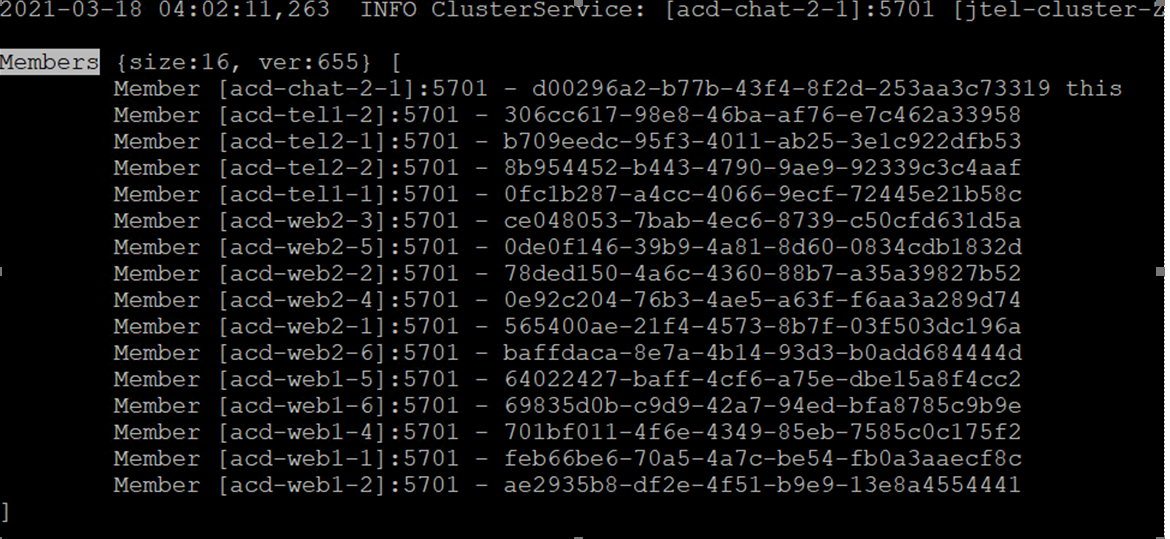
|
| TEL | Disk Space | Speicherplatz | Verwenden Sie den Windows-Explorer, um sicherzustellen, dass die Festplatte nicht voll istUse the windows explorer to make sure the disk is not full. |
| WEB | Webservers | Web-Server | Prüfen Sie jeden Webserver einzeln mitPrüfe each webserver individually using http://<server>:8080/CarrierPortal/sysadmin/login Make sure it is possible to login. Stellen Sie sicher, dass die Anmeldung möglich ist. Stellen Sie sicher, dass das Logo sichtbar ist (falls nicht, deutet dies auf einen Fehler beim Einhängen der Dateifreigabe in Make sure the logo is visible (if not, this indicates a file share mount error to /home/jtel/shared hin) |
| WEB | Certificate | Make sure the certificate is OK by accessing the system via the load-balancer (if necessary, using an alias in your hosts file). This is mandatory, for example, for SalesForce integrations. | Zertifikat | Stellen Sie sicher, dass das Zertifikat in Ordnung ist, indem Sie über den Load-Balancer auf das System zugreifen (ggf. unter Verwendung eines Alias in Ihrer Hosts-Datei). Dies ist z. B. für SalesForce-Integrationen zwingend erforderlich. |
| WEB | Statistik Zähler | Um den allgemeinen Zustand der Webanwendung und der Datenbank zu prüfen, können die folgenden Statistikseiten verwendet werden | WEB | Stats Counters | To Prüfe the general health of the web application and database, the following stats pages can be used: http(s)://<load-balancer>/CarrierPortal/pages/common/Stats.xhtml Cache counters (average should be below -Zähler (Durchschnitt sollte unter 1 ms liegen): 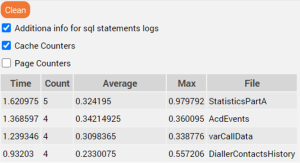
Page counters (average should be below Seitenzähler (Durchschnitt sollte unter 300 ms liegen): 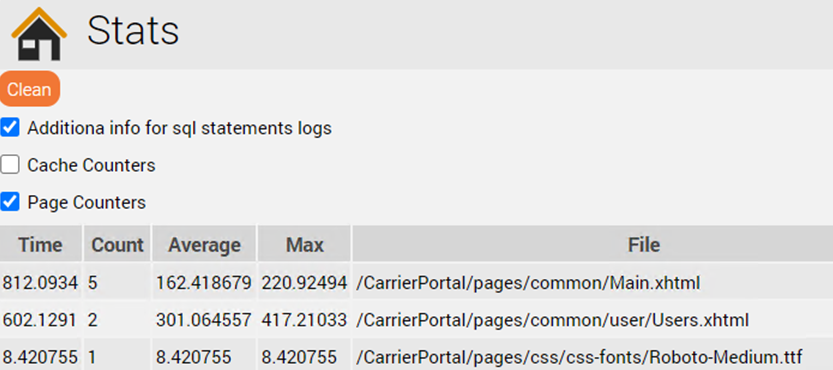
|
| CHAT | Application running | Applikation läuft | Stellen Sie sicher, dass die Chat-Anwendung läuftMake sure the chat application is running: ps -ef | grep jtel-clientmessenger |
| REST | Application running | Applikation läuft | Stellen Sie sicher, dass die Chat-Anwendung läuftMake sure the chat application is running: ps -ef | grep jrest |
