| Sv translation |
|---|
|
IntroductionThe TEL server runs the call flows for telephone calls in the jtel system. It also runs background processes, such as jobs to create statistics subscription e-mails and convert audio files or create audio with a TTS engine. Also, usually PBX connectors are run on the TEL server. InstallationFile DownloadsThe following script downloads all the files needed in this section. | Translations Ignore |
|---|
| Code Block |
|---|
powershell -command "& { Start-BitsTransfer -Source https://cdn.jtel.de/downloads/configs/8server_config_v8.reg -Destination $Env:UserProfile\Downloads }"
powershell -command "& { Start-BitsTransfer -Source https://cdn.jtel.de/downloads/configs/odbc_ini_v52.reg -Destination $Env:UserProfile\Downloads }"
powershell -command "& { Start-BitsTransfer -Source http://cdn.jtel.de/downloads/aculab/AculabInstaller.msi -Destination $Env:UserProfile\Downloads }"
powershell -command "& { Start-BitsTransfer -Source https://cdn.jtel.de/downloads/tools/AutoLogon.zip -Destination $Env:UserProfile\Downloads }" |
|
Import the downloaded file odbc_ini_v52.reg to the registry to configure the data sources in windows. You may need to change the password entries for each datasource, depending on the password configured for the mysql database. Prepare 8-Server RegistryImport the downloaded file 8server_config_v8.reg to the registry to prepare the registry for 8-Server. Install 8-ServerClone RepositoryYou will need to change the Machine ID setting - set this to the last byte of the IPv4 address in the local network. You need to change this value to HEX. Install 8-ServerClone Repository| Status |
|---|
| colour | Yellow |
|---|
| title | Important - THE STARTUP PROCEDURE IN STDCALL_MCP.CFG REQUIRES RC-5.23.13 AS MORE THAN 10 COMMANDS ARE REQUIRED |
|---|
|
Run the Run the following commands from a non elevated command prompt: | Translations Ignore |
|---|
| Code Block |
|---|
c:
cd \
mkdir \8Server
cd \8Server
git clone https://bitbucket.org/jtelgmbh/8-server-deploy.git deploy
cd deploy
git checkout release/rc-5.23.1214 |
|
Install 8-ServerTelephony and DeamonsRun the following commands from a non elevated command prompt: | Translations Ignore |
|---|
| Code Block |
|---|
c:
cd \8Server\deploy\OEM\JTEL\
first_install.cmd
copy_keyfile_en_mcp_v67.cmd |
|
Deamons OnlyRun the following commands from a non elevated command prompt: | Translations Ignore |
|---|
| Code Block |
|---|
c:
cd \8Server\deploy\OEM\JTEL\
first_install.cmd
copy_keyfile_en_daemon.cmd |
|
Install Aculab SIP and RTP StackInstall AITWindows FirewallThe following commands configure the windows firewall. Run these in an elevated cmd windowRun the following commands from a non elevated command prompt, and install for all users: | Translations Ignore |
|---|
| Code Block |
|---|
start %USERPROFILE%\Downloads\AculabInstaller.msi |
|
Install Aculab v67- Start the AIT application
- Choose "Connection" -> "Work offline".
- "File" -> ""Import" -> Load Aculab Package File...".
c:\8Server\deploy\oem\jtel\aculab\v67.apf
Target Directory:"Install"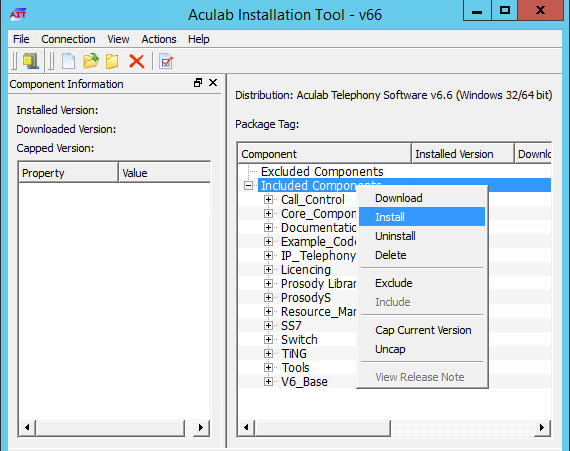 Image Removed Image Removed
| Warning |
|---|
Note - if secure boot is not switched off in the virtual environment, the installation of the drivers might fail. |
netsh advfirewall firewall add rule name="ICMPv4" protocol=icmpv4:8,any dir=in action=allow edge=yes
netsh advfirewall firewall add rule name="Hazelcast" dir=in action=allow protocol=TCP localport=5701-5801 edge=no
netsh advfirewall firewall add rule name="RTP" dir=in action=allow protocol=UDP localport=30000-34999 edge=yes
netsh advfirewall firewall add rule name="SIP" dir=in action=allow protocol=UDP localport=5060 edge=yes
netsh advfirewall firewall add rule name="UDP Local" dir=in action=allow protocol=UDP localport=1-65535 edge=no |
|
Install Aculab SIP and RTP StackInstall AITRun the following commands from a non elevated command prompt, and install for all users: | Translations Ignore |
|---|
| Code Block |
|---|
start %USERPROFILE%\Downloads\AculabInstaller.msi |
|
Install Aculab v67- Start the AIT application
- Choose "Connection" -> "Work offline".
- "File" -> ""Import" -> Load Aculab Package File...".
c:\8Server\deploy\oem\jtel\aculab\v67.apf
Target Directory:"Install"Image Added
| Warning |
|---|
Note - if secure boot is not switched off in the virtual environment, the installation of the drivers might fail. |
- Add a Prosody-S instance
- Choose "Prosody S" ... "Add
- Add a Prosody-S instance
- Choose "Prosody S" ... "Add...":
- The serial number can be freely chosen, as can the security key. We recommend 100000 and jtel respectively.
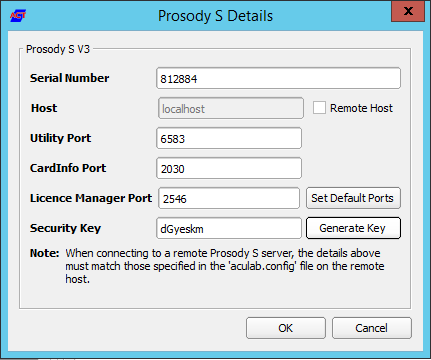
- Install the licenses
- Choose "License Manager", Install Licence Keys...
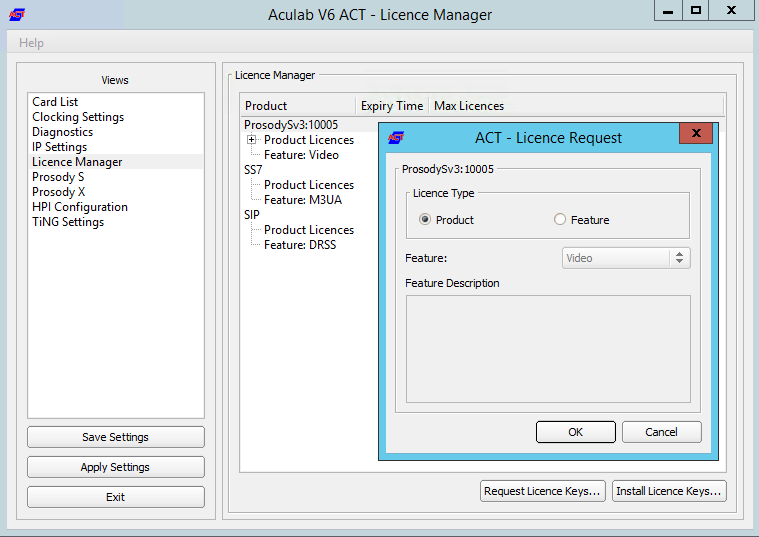
- Save and apply
- Choose "Save Settings" then "Apply Settings".
Symmetric RTPTo configure symmetric RTP, a file is created in C:\Aculab\v67\cfg\mhp.cfg with the following content: | Translations Ignore |
|---|
| Code Block |
|---|
title | File LocalRtpSymmetric=1 |
|
Port RangeIf it is required, that a port range is used for RTP, then the file C:\ \ aculab\ \ v67\ \ cfg\ \ mhp.cfgaculab.config must be edited, set the port range as is required by the remote end (PBX / SIP Trunk): | Translations Ignore |
|---|
| Code Block |
|---|
...
							<rxrange minvalue="30000" maxvalue="34999"/>
... |
|
Services| Status |
|---|
| colour | Yellow |
|---|
| title | Very Important for Windows Server 2019 |
|---|
|
Setup the following Aculab services to start only manually: - Aculab Prosody S
- Aculab Resource Manager
- Aculab Startup Service
Setup the following Aculab services to be disabled: Startup ScriptsNet Use |
LocalRtpSymmetric=1 |
Startup Scripts
Net Use
Check the file c:\8Server\bin\startup.cmd - to see whether the net use command needs to be changed or not.
Shortcut
Create a shortcut for:
Check the file
c:\8Server\bin\startup.cmd - to see whether the net use command needs to be changed or not.
| Warning |
|---|
|
Comment out the following lines in the startup.cmd file:
aculabservicemanager -stop sip
net use \\acd-store\shared /u:jtel fireball |
Shortcut
Create a shortcut for:
c:\8Server\bin\startup_launcher.cmd
and place this in shell:startup.
Configuration Files
Create Default Configuration giAculab.cfg
Start a cmd up, and start gihal. This will create a default giAculab.cfg file.
| Warning |
|---|
Note - make sure the aculab services are started at this point. |
| Note |
|---|
Sometimes windows does not |
| Note |
|---|
Sometimes windows does not update the path immediately after installation of the components above. The following must be present in the path, and as an environment variable, for the rest of the installation to work:
PATH=...;c:\8Server\gi2\bin
R5_CONFIG_DIR=c:\8Server\Config\ |
| Translations Ignore |
|---|
| Code Block |
|---|
gihal

# If it starts, press CTRL+C then cancel |
|
Edit giAculab.cfg
The file is in:
c:\8Server\gi2\config\giAculab.cfg
giAculab.cfg is now configured for SIP with 8-Server. Replace the SIP section in the newly created file with the section below, changing the following:
- channel_count to the number of licensed SIP channels
- default_rtp_ip should be changed to the IP address of the NIC in the telephony network in multi-homed systems. Leave as is, if the system is not multi-homed.
| Translations Ignore |
|---|
| Code Block |
|---|
    [SIP]
    {
      netport			                = 0
      channel_count		                = 30
      default_vmp_set		            = "VMP_SET1"
      default_rtp_ip		            = "0.0.0.0"
      default_rtp_dscp		            = 46
      defaultSignallingGateway	        = ""
      numberOnly		                = FALSE
      rfc2833RxToneEvent	            = TRUE
      rfc2833RxInbandToneRegeneration	= TRUE
      rfc2833TxToneConversion	        = TRUE
} |
|
Edit gi2.ini
Edit the file C:\8Server\gi2\bin\gi2.ini
At the very bottom, change the following setting to 2 (standard is 1):
| Translations Ignore |
|---|
| Code Block |
|---|
DISABLE_ERROR_DIALOG = 2 |
|
Edit StdCall_MCP.cfg
| Status |
|---|
| colour | Yellow |
|---|
| title | Important - do not use an older config under Windows Server 2019 |
|---|
|
The following settings are changed in the file:
c:\8Server\config\StdCall_MCP.cfg
- Enable_SIP_Registrar - for installations which require a registrar for the SIP trunk (e.g. Panasonic PBX installations)
- Default_SIP_Contact - change to the IP address of the server (for multi-homed systems use the IP address of the NIC in the telephony network
- Startup_Command4 und Startup_Sleep4 - delete these lines if the machine does not require registration to a SIP trunk (for example NFON requires registration - in this case leave in!)
- Total_Channel_Count - Set to the total licensed SIP channel count
- Inbound_Use_Channels - Set to the number of agents + supervisors + queue + IVR channels
- Outbound_Use_Channels - Set to the number of agents + supervisors + call transfer channels
- Note: Total_Channel_Count = Inbound_Use_Channels + Outbound_Use_Channels
| Translations Ignore |
|---|
| Code Block |
|---|
ROOT
{
   StdCall_MCP
   {
      bool    Use_RemoteHAL                         = TRUE;

      integer LocalStream_RX_Port                   = 0;
      integer Dispatcher_ThreadCount                = 4;

      bool    Auto_SETUP_ACK                        = FALSE;
      string  Alert_DefaultFile                     = "c:\8Server\Voice\System\070.wav";

      integer Stream_Receiver_MaxUnconfirmedPackets = 8;
      integer Stream_Receiver_MaxBufferSize         = 16384;
      integer Stream_Sender_Timeout                 = 2000;
      integer Stream_Sender_MaxBufferSize           = 16384;

      integer SIP_Interceptor_Port                  = 5060;
      bool    Enable_SIP_Interceptor                = TRUE;
	  integer Start_SIP_Interceptor_After_Command   = 15;
	  bool    Enable_SIP_Registrar                  = FALSE;
      bool    Enable_L3_Monitor                     = FALSE;

      string  Default_SIP_Contact                   = "<sip:10.442.1113.81>84>";

	  string  Startup_Command0                      = "c:/windows/system32/taskkill.exe /im gihal.exe /f";
	  integer Startup_Sleep0                        = 2000;
	  string  Startup_Command1                      = "c:/aculabwindows/v67/bin/amd64/aculabservicemanager -stop sipsystem32/taskkill.exe /im giacu.exe /f";
	  integer Startup_Sleep1                        = 2000;
	  string  Startup_Command2                      = "c:/aculab/v67/bin/amd64/aculabservicemanager -startstop sip";
	  integer Startup_Sleep2                        = 2000;
	  string  Startup_Command3                      = "c:/8Serverwindows/gi2system32/bin/giHalnet.exe -wstop -tingtraceacuresmgr";
	  integer Startup_Sleep3                        = 50002000;
	  string  Startup_Command4                      = "c:/8Serverwindows/binsystem32/startup_registrations.cmdnet.exe stop prosodysserv";
	  integer Startup_Sleep4                        = 10002000;

	  string  ShutdownStartup_Command0Command5                      = "c:/windows/system32/taskkillnet.exe /im gihal.exe /fstop aculabstartupservice";
	  integer ShutdownStartup_Sleep0Sleep5                        = 2000;
	  string  ShutdownStartup_Command1Command6                      = "c:/windows/system32/taskkillnet.exe /im giacu.exe /fstart aculabstartupservice";
	  integer ShutdownStartup_Sleep1Sleep6                        = 2000;
	  string  ShutdownStartup_Command2Command7                      = "c:/aculabwindows/v67/bin/amd64/aculabservicemanager -stop sipsystem32/net.exe start acuresmgr";
	  integer ShutdownStartup_Sleep2Sleep7                        = 2000;

	  string  Startup_Command8  Controller1
      {
         integer Total_Channel_Count    = 0 "c:/windows/system32/net.exe start prosodysserv";
	  integer Startup_Sleep8      integer  Inbound_Use_Channels   = 0;
         integer Outbound_Use_Channels  = 02000;
 	        string  HALStartup_HostNameCommand9           = "127.0.0.1";
         bool    SIP_URL_Cleaner= "c:/aculab/v67/bin/amd64/aculabservicemanager -start sip";
	  integer Startup_Sleep9         = TRUE;
         bool= 2000;
	  string Ignore Startup_L1StatusCommand10        = TRUE;
         bool    RFC2833_DTMF_Detection = TRUE;
= "c:/8Server/gi2/bin/giHal.exe -w -tingtrace";
	  integer Startup_Sleep10        };
    };
};
|
|
8-Server Konfiguration
Startup 8-Server:
| Translations Ignore |
|---|
| Code Block |
|---|
c:\8Server\Bin\robot5.exe |
- "Machine ID" letztes Byte der IP Adresse
Bereich Internet Components
Nur bei Maschinen mit viele Leitungen: ggf. der Wert von "UDP" erhöhen.
Bereich UDP Settings
Nur bei den Betrieb von mehreren 8-Server:
Die Broadcast-Adresse des LAN Segments eintragenPort 20202 bestimmen
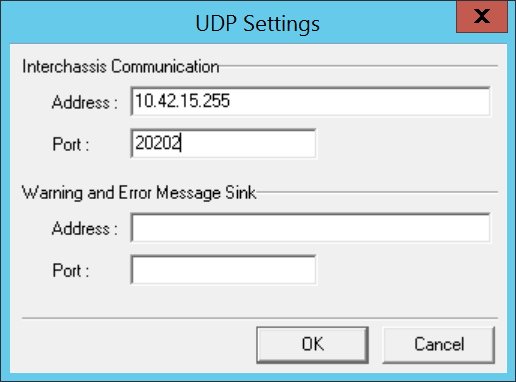 Image Removed
Bereich Daemon Processes
Ggf. bei ein reiner Daemonen-Server oder reine Telefonie-Server einige der Daemonen entfernen.
| Translations Ignore |
|---|
| Code Block |
|---|
| title | List of daemons of a combination server |
|---|
|
\\acd-store\shared\JTELCarrierPortal\AppServer\acd\Daemons\acd.Daemon.AcdEvents.Cleaner.r5
\\acd-store\shared\JTELCarrierPortal\AppServer\acd\Daemons\acd.Daemon.AcdEvents.Distribute.r5
\\acd-store\shared\JTELCarrierPortal\AppServer\acd\Daemons\acd.Daemon.DailyAutoGroupLogout.r5
\\acd-store\shared\JTELCarrierPortal\AppServer\acd\Daemons\acd.Daemon.DailyAutoUserLogout.r5
\\acd-store\shared\JTELCarrierPortal\AppServer\acd\Daemons\acd.Daemon.GroupDistribute.r5
\\acd-store\shared\JTELCarrierPortal\AppServer\acd\Daemons\acd.Daemon.LongCalls.Warning.r5
\\acd-store\shared\JTELCarrierPortal\AppServer\acd\Daemons\acd.Daemon.UDP.r5
\\acd-store\shared\JTELCarrierPortal\AppServer\conf\ConfServer.Daemon.UDP.r5
\\acd-store\shared\JTELCarrierPortal\AppServer\Portal.Daemon.8Server.LogFileCleaner.r5
\\acd-store\shared\JTELCarrierPortal\AppServer\Portal.Daemon.Audio.Converter.r5
\\acd-store\shared\JTELCarrierPortal\AppServer\Portal.Daemon.ChangeEvent.Manager.r5
\\acd-store\shared\JTELCarrierPortal\AppServer\Portal.Daemon.EventSpool.SMS.r5
\\acd-store\shared\JTELCarrierPortal\AppServer\Portal.Daemon.EventSpool.SMTP.r5
\\acd-store\shared\JTELCarrierPortal\AppServer\Portal.Daemon.Recordings.Cleaner.r5
\\acd-store\shared\JTELCarrierPortal\AppServer\Portal.Daemon.Recordings.Manager.r5
\\acd-store\shared\JTELCarrierPortal\AppServer\Portal.Daemon.ReportSubscriptions2.r5
\\acd-store\shared\JTELCarrierPortal\AppServer\Portal.Daemon.SystemStartSequence.Cleaner.v2.r5
\\acd-store\shared\JTELCarrierPortal\AppServer\Portal.Daemon.SystemStartSequence.Update.v2.r5
\\acd-store\shared\JTELCarrierPortal\AppServer\TimeServiceMonitor\portal.Daemon.TimeServiceMonitor.r5
C:\8Server\Samples\LogFileCleaner\8Server.Daemon.LogFileCleaner.mySQL.r5 |
Bei einem reinen Telefonie-Server müssen mindestens folgende Daemonen eingetragen werden (Die Pfade orientieren sich an der Beispielskonfiguration):
| Translations Ignore |
|---|
| Code Block |
|---|
| title | List of daemons of a telephony server |
|---|
|
\\acd-store\shared\JTELCarrierPortal\AppServer\acd\Daemons\acd.Daemon.UDP.r5
\\acd-store\shared\JTELCarrierPortal\AppServer\conf\ConfServer.Daemon.UDP.r5
\\acd-store\shared\JTELCarrierPortal\AppServer\Portal.Daemon.SystemStartSequence.Update.v2.r5
\\acd-store\shared\JTELCarrierPortal\AppServer\TimeServiceMonitor\portal.Daemon.TimeServiceMonitor.r5
C:\8Server\Samples\LogFileCleaner\8Server.Daemon.LogFileCleaner.mySQL.r5 |
Bei einem Daemonen-Server müssen mindestens folgende Daemonen eingetragen werden (Die Pfade orientieren sich an der Beispielskonfiguration):
| Translations Ignore |
|---|
| Code Block |
|---|
| title | List of daemons in a daemon server |
|---|
|
\\acd-store\shared\JTELCarrierPortal\AppServer\acd\Daemons\acd.Daemon.AcdEvents.Cleaner.r5
\\acd-store\shared\JTELCarrierPortal\AppServer\acd\Daemons\acd.Daemon.AcdEvents.Distribute.r5
\\acd-store\shared\JTELCarrierPortal\AppServer\acd\Daemons\acd.Daemon.DailyAutoGroupLogout.r5
\\acd-store\shared\JTELCarrierPortal\AppServer\acd\Daemons\acd.Daemon.DailyAutoUserLogout.r5
\\acd-store\shared\JTELCarrierPortal\AppServer\acd\Daemons\acd.Daemon.GroupDistribute.r5
\\acd-store\shared\JTELCarrierPortal\AppServer\acd\Daemons\acd.Daemon.LongCalls.Warning.r5
\\acd-store\shared\JTELCarrierPortal\AppServer\acd\Daemons\acd.Daemon.UDP.r5
\\acd-store\shared\JTELCarrierPortal\AppServer\Portal.Daemon.8Server.LogFileCleaner.r5
\\acd-store\shared\JTELCarrierPortal\AppServer\Portal.Daemon.Audio.Converter.r5
\\acd-store\shared\JTELCarrierPortal\AppServer\Portal.Daemon.ChangeEvent.Manager.r5
\\acd-store\shared\JTELCarrierPortal\AppServer\Portal.Daemon.EventSpool.SMS.r5
\\acd-store\shared\JTELCarrierPortal\AppServer\Portal.Daemon.EventSpool.SMTP.r5
\\acd-store\shared\JTELCarrierPortal\AppServer\Portal.Daemon.Recordings.Cleaner.r5
\\acd-store\shared\JTELCarrierPortal\AppServer\Portal.Daemon.Recordings.Manager.r5
\\acd-store\shared\JTELCarrierPortal\AppServer\Portal.Daemon.ReportSubscriptions2.r5
\\acd-store\shared\JTELCarrierPortal\AppServer\Portal.Daemon.SystemStartSequence.Cleaner.v2.r5
\\acd-store\shared\JTELCarrierPortal\AppServer\Portal.Daemon.SystemStartSequence.Update.v2.r5
\\acd-store\shared\JTELCarrierPortal\AppServer\TimeServiceMonitor\portal.Daemon.TimeServiceMonitor.r5
C:\8Server\Samples\LogFileCleaner\8Server.Daemon.LogFileCleaner.mySQL.r5 |
Hiermit ist die Interaktive Grund-Konfiguration des 8Servers abgeschlossen. Der 8Server kann nun beendet werden, so dass eine gültige Lizenz generiert und eingespielt werden kann.
8Server Lizenz anfordern
Die Anforderung der Lizenz erfolgt mittels des Programms C:\8Server\bin\KeyOrder6.exe direkt aus dem Explorer:
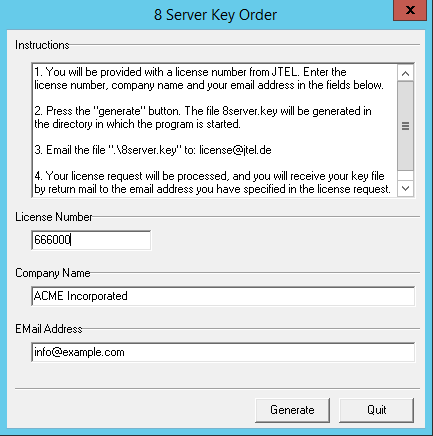 Image Removed
Die Datei C:\8Server\bin\8server.key wird an support@jtel.de gesendet.
Sobald eine gültige Lizenzdatei verfügbar ist, muss diese ins Verzeichnis C:\8Server\Config Verzeichnis eingespielt werden.
Im Anschluss wird der Platform UDP Listener mit folgenden Befehlen installiert:
| Translations Ignore |
|---|
| Code Block |
|---|
| title | Installation des Platform UDP Listeners |
|---|
|
C:
md \PlatformUDPlistener
xcopy /E \\acd-store\shared\JTELCarrierPortal\Utils\Install\PlatformUDPListener C:\PlatformUDPlistener
copy \\acd-store\shared\hazelcast.xml C:\PlatformUDPlistener\conf |
Verknüpfungen
Verknüpfung von
c:\PlatformUDPListener\startListener.bat
Auf den Desktop sowie nach shell:startup legen.
Test
Platform UDP Listener starten. Es sollten nun im Cluster alle TEL Nodes gefunden werden. Wenn zuvor, die Webserver und DBM installiert wurden, sollten diese Nodes nun auch im Cluster aktiv sein.
Windows Autostart
Bedingung für die Installation durch uns, ist ein lokaler Administrator Account.
Ferner ist es zu empfehlen, dass die Maschine nicht in der Domäne des Kunden eingebunden ist. Hier gibt es einfach die Möglichkeit, dass zu viele Policies uns in die Suppe spucken.
Maschine ohne "Administrator" Login
Dies betrifft meistens Maschinen die in der Kunden-Domäne sind.
Damit der 8-Server korrekt läuft, muss es mit "Als Administrator ausführen" gestartet werden.
Es gibt jedoch einen Weg, dies automatisch zu machen.
Voraussetzung ist, dass wir die Einstellungen der Benutzerkontensteuerung verändern können, sollte dies nicht möglich sein, MUSS der Kunde das anpassen. Sonst an dieser Stelle: HALT.
Einstellungen der Benutzerkontensteuerung ändern
Auf den Startmenü clicken oder Windows Taste drücken.
Dann eingeben:
Benutzerkontensteuerung (Deutsches Windows) oder User Account Control.
Siehe Screenshot:
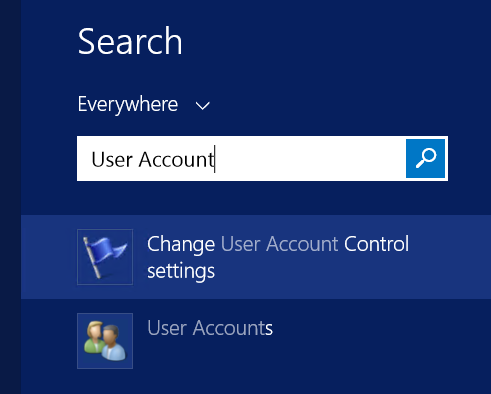 Image Removed
Den entsprechenden Menüpunkt auswählen, und dann die Benutzerkontensteuerung auf die Niedrigste Stufe stellen - siehe Screenshot.
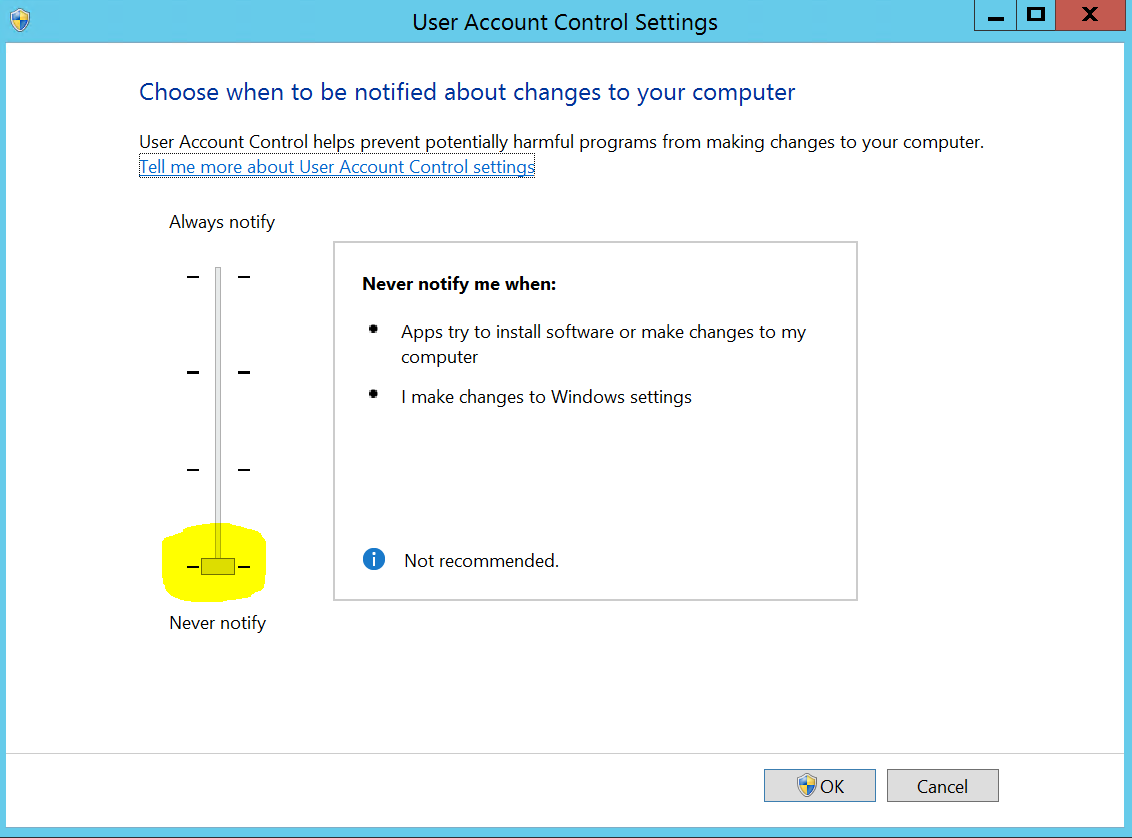 Image Removed
Autostart Installieren
http://cdn.jtel.de/downloads/tools/AutoLogon.zip
Entpacken, und für den Benutzer (Administrator oder den jtel Benutzer) ein Autologin einrichten.
Anschließend testen:
- Maschine neu starten
- Nachdem die Maschine gebootet ist, sollte der User sich automatisch angemeldet haben, und alle relevanten Dienste sollten laufen
Windows Firewall
Falls die Windows Firewall aktiviert bleiben soll, müssen ein paar Anpassungen getätigt werden.
Folgende Befehle als Administrator im cmd Fenster ausführen:
| Translations Ignore |
|---|
| Code Block |
|---|
| title | Windows Firewall adjustments - run as administrator in cmd |
|---|
|
netsh advfirewall firewall add rule name="ICMPv4" protocol=icmpv4:8,any dir=in action=allow edge=yes
netsh advfirewall firewall add rule name="Hazelcast" dir=in action=allow protocol=TCP localport=5701-5801 edge=no
netsh advfirewall firewall add rule name="RTP" dir=in action=allow protocol=UDP localport=30000-34999 edge=yes
netsh advfirewall firewall add rule name="SIP" dir=in action=allow protocol=UDP localport=5060 edge=yes
netsh advfirewall firewall add rule name="UDP Local" dir=in action=allow protocol=UDP localport=1-65535 edge=no |
Aculab Port Eingrenzung
Damit das UDP von Remote auch an bestimmte Ports in Aculab ankommt, muss zusätzlich die Aculab Konfiguration angepasst werden.
Mit notepad++ folgende Datei bearbeiten: C:\aculab\v67\cfg\aculab.config und die Port Range auf 30000 bis 34999 setzen:
| Translations Ignore |
|---|
| Code Block |
|---|
| title | C:\aculab\v67\cfg\aculab.config |
|---|
|
...
							<rxrange minvalue="30000" maxvalue="34999"/>
... |
| Sv translation |
|---|
|
           = 20000;
	  string  Startup_Command11                     = "c:/8Server/bin/startup_registrations.cmd";
	  integer Startup_Sleep11                       = 1000;

	  string  Shutdown_Command0                     = "c:/windows/system32/taskkill.exe /im gihal.exe /f";
	  integer Shutdown_Sleep0                       = 2000;
	  string  Shutdown_Command1                     = "c:/windows/system32/taskkill.exe /im giacu.exe /f";
	  integer Shutdown_Sleep1                       = 2000;

      Controller1
      {
         integer Total_Channel_Count    = 20;
         integer Inbound_Use_Channels   = 10;
         integer Outbound_Use_Channels  = 10;
         string  HAL_HostName           = "127.0.0.1";
         bool    SIP_URL_Cleaner        = TRUE;
		 bool    SIP_Number_Cleaner     = TRUE;
         bool    Ignore_L1Status        = TRUE;
         bool    RFC2833_DTMF_Detection = TRUE;
      };
   };
};
|
|
8-Server ConfigurationStartup 8-Server: | Translations Ignore |
|---|
| Code Block |
|---|
c:\8Server\Bin\robot5.exe |
|
ConfigurationMachine ID (Settings ... General)Set to the last byte of the IPv4 address of the machine. Internet ComponentsIncrease the number of UDP components, but only on machines which have a lot of lines. Recommend: up to 200 lines use 40. Above 200 lines, increase by 20 for every additional 100 lines. UDP SettingsIf building a cluster with more than one 8-Server, enter the broadcast address for interchassis communication, using port 20202: Image Added
Daemon Processes
Check the loaded deamons, and possibly remove not needed processes.
The following list is for a combined server (telephony and daemon applications): Beschreibung der RolleDie TEL Server sind dafür zuständig Call-Flow-Applikationen und zentrale Verwaltungs- und Steuerfunktionen in Form von R5-Skripten auszuführen. Des weiteren werden auf diesen Servern in der Regel auch die Connectoren für Synchronisation verschiedner Bentzer und Telefonie-Stati der Telefonanlagen installiert. Einrichtung der Zeitsynchronisation (Alternativer Zeitdienst)portal.Daemon.TimeServiceMonitor.r5 stoppen im 8-Server falls installiert. Zeitdienst herunterladen und installieren: http://cdn.jtel.de/downloads/NTP/ntp-4.2.8p10-win32-setup.exe Immer auf next, bis zur Auswahl der Zeitserver. Zuerst den Kundenserver angeben (falls vorhanden), dann die ptb Zeitserver: ptbtime1.ptb.de,ptbtime2.ptb.de,ptbtime3.ptb.de 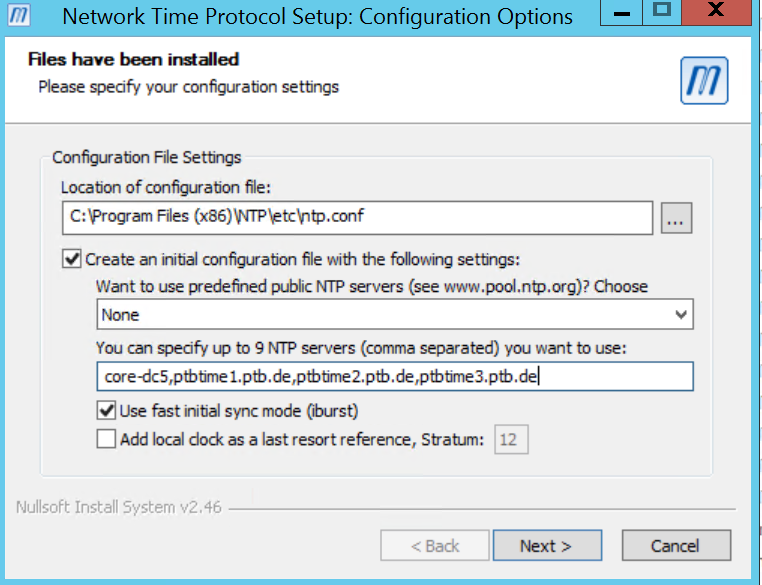 Image Removed Image Removed
Dann installation abschließen. Monitor installieren: http://cdn.jtel.de/downloads/NTP/ntp-time-server-monitor-104.exe Sicherstellen dass dienst läuft. Monitor prüfen, dass mindestens einer der Zeitserver "grün" ist. 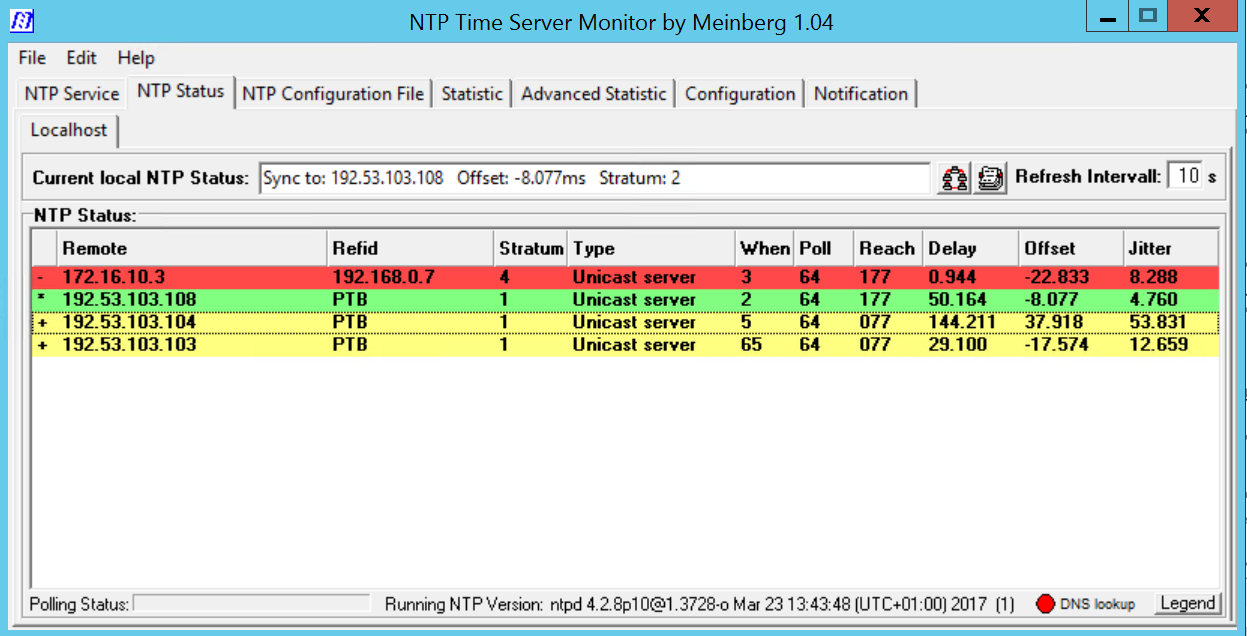 Image Removed Image Removed
Achtung: - Sicherstellen, dass der Parameter im Portal Portal.Alarming.Time.WindowsTimeService auf 0 gestellt ist.
Konfigurieren der DatenquellenAls nächstes müssen die Datenquellen im ODBC Administrator konfiguriert werden. Folgende Registry-File downloaden und importieren: https://cdn.jtel.de/downloads/configs/odbc_ini_v52.reg Hinweis: Konfigurationsdateien für neuere ODBC Treiber sind ebenfalls vorhanden. Es wird jedoch empfohlen, wegen Speicherprobleme im MySQL ODBC Treiber, mit dieser Version zu arbeiten. Auch mit den neuesten 8.x Treiber treten Speicherprobleme auf, wenn Datenbankverbindungen abbrechen. Installieren des 8ServersRepository Clonenhttps://bitbucket.org/jtelgmbh/8-server-deploy.git in das zu erstellende Verzeichnis c:\8Server\deployWechsel auf das gewünschte Release, beispielsweise release/rc-5.23.9 (derzeit aktuell empfohlen)
| Note |
|---|
| Beide Aktionen erfordern die Kenntnis gültiger Zugangsberechtigungen zum zentralen jtel Software-Server. |
Software InstallierenTelefonie und Daemonen: | Translations Ignore |
|---|
| Code Block |
|---|
| title | Installation of an 8 server for telephony and daemons |
|---|
| c:\8Server\deploy\OEM\JTEL\first_install.cmd
c:\8Server\deploy\OEM\JTEL\copy_keyfile_en_mcp_v67.cmd |
Nur Daemonen: | Translations Ignore |
|---|
| Code Block |
|---|
| title | Installation of an 8 server for administration and control functions |
|---|
| c:\8Server\deploy\OEM\JTEL\first_install.cmd
c:\8Server\deploy\OEM\JTEL\copy_keyfile_en_daemon.cmd |
C++ Runtimes installierenFolgende Runtimes installieren: | Translations Ignore |
|---|
| Code Block |
|---|
| C:\8Server\deploy\OEM\JTEL\Required\vcredist_2012_x64_11.0.61030.exe /passive /norestart
C:\8Server\deploy\OEM\JTEL\Required\vcredist_2012_x86_11.0.61030.exe /passive /norestart
C:\8Server\deploy\OEM\JTEL\Required\vcredist_2015_x64_14.0.24123.exe /install /passive /norestart
C:\8Server\deploy\OEM\JTEL\Required\vcredist_2015_x86_14.0.24123.exe /install /passive /norestart
C:\8Server\deploy\OEM\JTEL\Required\ww_icl_redist_ia32_2017.1.143.msi /quiet /passive
C:\8Server\deploy\OEM\JTEL\Required\ww_icl_redist_intel64_2017.1.143.msi /quiet /passive |
AIT Installierenv67 Paket installieren- AIT Starten
- "Connection" -> "Work offline".
- "File" -> ""Import" -> Load Aculab Package File...".
c:\8Server\deploy\oem\jtel\aculab\v67.apf
Zielpfad:"Install"Image Removed - Installation von allen Treibern (Windows Abfragen) bestätigen
Aculab KonfigurationACT Starten"Prosody S" ... "Add...":
Die Seriennummer kann frei gewählt werden. Als Security Key jtel angeben.
Image Removed
"IP Settings", "Enable SIP on Host" aktivieren:
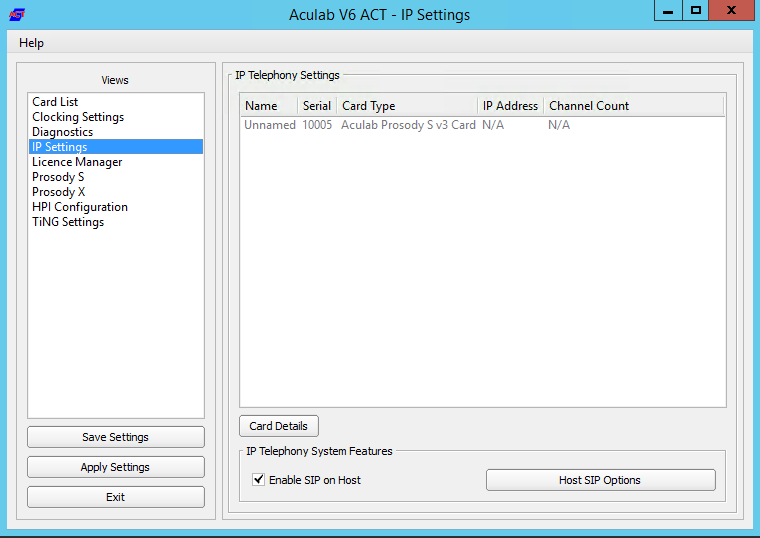 Image Removed Image Removed
"License Manager", Lizenz einspielen (Install Licence Keys...)
Image Removed
"Save Settings" gefolgt dann "Apply Settings".Startup ScriptsGgf in c:\8Server\bin\startup.cmd das "net use" anpassen. VerknüpfungenVerknüpfung von c:\8Server\bin\startup_launcher.cmd Auf den Desktop sowie nach shell:startup legen. Aculab Konfiguration für 8-ServergiAculab config erzeugen (cmd als ADMIN): Achtung: manchmal schluckt Windows das Verändern des Pfads nicht 100% sofort. Wenn nicht (falls gihal.exe nicht gefunden wird), dann neu booten. | Translations Ignore |
|---|
| Code Block |
|---|
| gihal
# If it starts, press CTRL+C then cancel |
giAculab.cfg muss nun angepasst werden. Den Einstellungsbereich unten kopieren und in der Zieldatei ersetzen. channel_count auf die Anzahl der SIP Kanäle stellendefault_rtp_ip muss bei Multi-Homed Maschinen auf die IP Adresse der Netzwerkkarte für die Telefonie gesetzt werden
| Translations Ignore |
|---|
| Code Block |
|---|
| title | Changes to C: \\ 8Server \\ gi2 \\ config \\ giAculab.cfg |
|---|
| [SIP]
{
netport = 0
channel_count = 30
default_vmp_set = "VMP_SET1"
default_rtp_ip = "0.0.0.0"
default_rtp_dscp = 46
defaultSignallingGateway = ""
numberOnly = FALSE
rfc2833RxToneEvent = TRUE
rfc2833RxInbandToneRegeneration = TRUE
rfc2833TxToneConversion = TRUE
} |
Eine weitere Änderung betrifft die Datei C:\8Server\gi2\bin\gi2.ini: hier sollte der Wert DISABLE_ERROR_DIALOG folgendermaßen angepasst werden: | Translations Ignore |
|---|
| Code Block |
|---|
| title | Changes to C: \\ 8Server \\ gi2 \\ bin \\ gi2.ini |
|---|
| DISABLE_ERROR_DIALOG = 2 |
Zusätzlich wird eine Datei C:\8Server\bin\gi2.ini angelegt, mit folgenden Inhalt: | Translations Ignore |
|---|
| Code Block |
|---|
| title | Changes to C: \\ 8Server \\ bin \\ gi2.ini |
|---|
| CONFIG_DIR = ../gi2/config
LOG_DIR = ../log |
Die letzte Datei, an der manuelle Anpassungen erfolgen müssen, ist C:\8Server\config\StdCall_MCP.cfg Folgende Einstellungen insbesonders beleuchten: Enable_SIP_Registrar - für Installationen mit eingehende Registrierungen (insbesonders Panasonic)Default_SIP_Contact - hier die IP Adresse des SIP Interfaces eintragenStartup_Command4 und Startup_Sleep4 - löschen, falls die Maschine keine Registrierung nach Aussen aufbauen muss (derzeit alle Installationen ausser NFON)
Total_Channel_Count - Entspricht die Gesamtzahl der SIP KanäleInbound_Use_Channels - Entspricht nAgents + nSupervisor + nQueueChannelsOutbound_Use_Channels - Entspricht nAgents + nSupervisor + nCallTransferChannelsBeachte: Total_Channel_Count = Inbound_Use_Channels + Outbound_Use_Channels
| Translations Ignore |
|---|
| Code Block |
|---|
| title | Changes to C: \\ 8Server \\ config \\ StdCall_MCP.cfg |
|---|
| ROOT
{
StdCall_MCP
{
bool Use_RemoteHAL = TRUE;
integer LocalStream_RX_Port = 0;
integer Dispatcher_ThreadCount = 4;
bool Auto_SETUP_ACK = FALSE;
string Alert_DefaultFile = "c:\8Server\Voice\System\070.wav";
integer Stream_Receiver_MaxUnconfirmedPackets = 8;
integer Stream_Receiver_MaxBufferSize = 16384;
integer Stream_Sender_Timeout = 2000;
integer Stream_Sender_MaxBufferSize = 16384;
integer SIP_Interceptor_Port = 5060;
bool Enable_SIP_Interceptor = TRUE;
integer Start_SIP_Interceptor_After_Command = 1;
bool Enable_SIP_Registrar = FALSE;
bool Enable_L3_Monitor = FALSE;
string Default_SIP_Contact = "<sip:10.4.11.81>";
string Startup_Command0 = "c:/windows/system32/taskkill.exe /im gihal.exe /f";
integer Startup_Sleep0 = 2000;
string Startup_Command1 = "c:/aculab/v67/bin/amd64/aculabservicemanager -stop sip";
integer Startup_Sleep1 = 2000;
string Startup_Command2 = "c:/aculab/v67/bin/amd64/aculabservicemanager -start sip";
integer Startup_Sleep2 = 2000;
string Startup_Command3 = "c:/8Server/gi2/bin/giHal.exe -w -tingtrace";
integer Startup_Sleep3 = 5000;
string Startup_Command4 = "c:/8Server/bin/startup_registrations.cmd";
integer Startup_Sleep4 = 1000;
string Shutdown_Command0 = "c:/windows/system32/taskkill.exe /im gihal.exe /f";
integer Shutdown_Sleep0 = 2000;
string Shutdown_Command1 = "c:/windows/system32/taskkill.exe /im giacu.exe /f";
integer Shutdown_Sleep1 = 2000;
string Shutdown_Command2 = "c:/aculab/v67/bin/amd64/aculabservicemanager -stop sip";
integer Shutdown_Sleep2 = 2000;
Controller1
{
integer Total_Channel_Count = 0;
integer Inbound_Use_Channels = 0;
integer Outbound_Use_Channels = 0;
string HAL_HostName = "127.0.0.1";
bool SIP_URL_Cleaner = TRUE;
bool Ignore_L1Status = TRUE;
bool RFC2833_DTMF_Detection = TRUE;
};
};
};
|
Symmetrisches RTPWir installieren alle Systeme mit symmetrisches RTP. Dies erfordert, dass eine neue Konfigurationsdatei Namens C:\Aculab\v67\cfg\mhp.cfg mit folgendem Inhalt angelegt wird: | Translations Ignore |
|---|
| Code Block |
|---|
| title | File C: \\ aculab \\ v67 \\ cfg \\ mhp.cfg |
|---|
| LocalRtpSymmetric=1 |
8-Server KonfigurationVon diese URL, die Registry Datei importieren: MySQL 8.xhttp://cdn.jtel.de/downloads/configs/8server_config_v8.reg MySQL 5.xhttp://cdn.jtel.de/downloads/configs/8server_config.reg 8-Server als ADMIN starten (rechter Mausklick auf robot5.exe im Verzeichnis c:\8Server\Config). WICHTIG: Nicht über startup.cmd oder startup_launcher.cmd! General Settings, General- "Machine ID" letztes Byte der IP Adresse
Bereich Internet ComponentsNur bei Maschinen mit viele Leitungen: ggf. der Wert von "UDP" erhöhen. Bereich UDP SettingsNur bei den Betrieb von mehreren 8-Server: Die Broadcast-Adresse des LAN Segments eintragenPort 20202 bestimmen
Image Removed
Bereich Daemon ProcessesGgf. bei ein reiner Daemonen-Server oder reine Telefonie-Server einige der Daemonen entfernen.| Translations Ignore |
|---|
| Code Block |
|---|
|
| title | List of daemons of a combination server |
|---|
|
\\acd-store\shared\JTELCarrierPortal\AppServer\acd\Daemons\acd.Daemon.AcdEvents.Cleaner.r5
\\acd-store\shared\JTELCarrierPortal\AppServer\acd\Daemons\acd.Daemon.AcdEvents.Distribute.r5
\\acd-store\shared\JTELCarrierPortal\AppServer\acd\Daemons\acd.Daemon.DailyAutoGroupLogout.r5
\\acd-store\shared\JTELCarrierPortal\AppServer\acd\Daemons\acd.Daemon.DailyAutoUserLogout.r5
\\acd-store\shared\JTELCarrierPortal\AppServer\acd\Daemons\acd.Daemon.AcdEvents. |
|
Cleaner.r5
\\acd-store\shared\JTELCarrierPortal\AppServer\acd\Daemons\acd.Daemon. |
|
Distribute.r5
\\acd-store\shared\JTELCarrierPortal\AppServer\acd\Daemons\acd.Daemon. |
|
DailyAutoGroupLogout.r5
\\acd-store\shared\JTELCarrierPortal\AppServer\ |
|
DailyAutoUserLogout.r5
\\acd-store\shared\JTELCarrierPortal\AppServer\acd\Daemons\ |
|
GroupDistribute.r5
\\acd-store\shared\JTELCarrierPortal\AppServer\acd\Daemons\ |
|
Warning.r5
\\acd-store\shared\JTELCarrierPortal\AppServer\ |
|
r5
\\acd-store\shared\JTELCarrierPortal\AppServer\ |
|
UDP.r5
\\acd-store\shared\JTELCarrierPortal\AppServer\Portal.Daemon. |
|
LogFileCleaner.r5
\\acd-store\shared\JTELCarrierPortal\AppServer\Portal.Daemon. |
|
Converter.r5
\\acd-store\shared\JTELCarrierPortal\AppServer\Portal.Daemon.ChangeEvent. |
|
Manager.r5
\\acd-store\shared\JTELCarrierPortal\AppServer\Portal.Daemon. |
|
SMS.r5
\\acd-store\shared\JTELCarrierPortal\AppServer\Portal.Daemon. |
|
SMTP.r5
\\acd-store\shared\JTELCarrierPortal\AppServer\ |
|
\\acd-store\shared\JTELCarrierPortal\AppServer\Portal.Daemon. |
|
Bei einem reinen Telefonie-Server müssen mindestens folgende Daemonen eingetragen werden (Die Pfade orientieren sich an der Beispielskonfiguration):
| Translations Ignore |
|---|
| Code Block |
|---|
| title | List of daemons of a telephony server |
|---|
|
Manager.r5
\\acd-store\shared\JTELCarrierPortal\AppServer\ |
|
ReportSubscriptions2.r5
\\acd-store\shared\JTELCarrierPortal\AppServer\ |
|
Portal.Daemon.SystemStartSequence.Cleaner.v2.r5
\\acd-store\shared\JTELCarrierPortal\AppServer\Portal.Daemon.SystemStartSequence.Update.v2.r5
\\acd-store\shared\JTELCarrierPortal\AppServer\TimeServiceMonitor\portal.Daemon.TimeServiceMonitor.r5
C:\8Server\Samples\LogFileCleaner\8Server.Daemon.LogFileCleaner.mySQL.r5 |
|
The following list is for a pure telephony server (daemon applications are running on a separate server):
\\acd-store\shared\JTELCarrierPortal\AppServer\acd\Daemons\acd.Daemon. |
|
UDP.r5
\\acd-store\shared\JTELCarrierPortal\AppServer\ |
|
UDP.r5
\\acd-store\shared\JTELCarrierPortal\AppServer\ |
|
Portal.Daemon.SystemStartSequence.Update. |
|
v2.r5
\\acd-store\shared\JTELCarrierPortal\AppServer\ |
|
LogFileCleaner\8Server.Daemon |
|
The following list is for a pure daemon application server:
| Translations Ignore |
|---|
| Code Block |
|---|
| title | List of daemons in a daemon server |
|---|
| \\acd-store\shared\JTELCarrierPortal\AppServer\acd\Daemons\ |
|
Cleaner.r5
\\acd-store\shared\JTELCarrierPortal\AppServer\ |
|
Distribute.r5
\\acd-store\shared\JTELCarrierPortal\AppServer\acd\Daemons\ |
|
r5
\\acd-store\shared\JTELCarrierPortal\AppServer\acd\ |
|
r5
\\acd-store\shared\JTELCarrierPortal\AppServer\acd\Daemons\ |
|
GroupDistribute.r5
\\acd-store\shared\JTELCarrierPortal\AppServer\ |
|
Warning.r5
\\acd-store\shared\JTELCarrierPortal\AppServer\ |
|
r5
\\acd-store\shared\JTELCarrierPortal\AppServer\Portal.Daemon. |
|
8Server.LogFileCleaner.r5
\\acd-store\shared\JTELCarrierPortal\AppServer\Portal.Daemon. |
|
r5
\\acd-store\shared\JTELCarrierPortal\AppServer\Portal.Daemon. |
|
Manager.r5
\\acd-store\shared\JTELCarrierPortal\AppServer\ |
|
Portal.Daemon.EventSpool. |
|
Hiermit ist die Interaktive Grund-Konfiguration des 8Servers abgeschlossen. Der 8Server kann nun beendet werden, so dass eine gültige Lizenz generiert und eingespielt werden kann.
8Server Lizenz anfordern
Die Anforderung der Lizenz erfolgt mittels des Programms C:\8Server\bin\KeyOrder6.exe direkt aus dem Explorer:
Image Removed
Die Datei C:\8Server\bin\8server.key wird an support@jtel.de gesendet.
Sobald eine gültige Lizenzdatei verfügbar ist, muss diese ins Verzeichnis C:\8Server\Config Verzeichnis eingespielt werden.
Im Anschluss wird der Platform UDP Listener mit folgenden Befehlen installiert:
| Translations Ignore |
|---|
| Code Block |
|---|
| title | Installation des Platform UDP Listeners |
|---|
|
C:
md \PlatformUDPlistener
xcopy /E \acd-store\shared\JTELCarrierPortal\AppServer\Portal.Daemon.EventSpool.SMTP.r5
\\acd-store\shared\JTELCarrierPortal\ |
|
AppServer\Portal.Daemon.Recordings.Cleaner.r5
\\acd-store\shared\ |
|
Verknüpfungen
Verknüpfung von
c:\PlatformUDPListener\startListener.bat
Auf den Desktop sowie nach shell:startup legen.
Test
Platform UDP Listener starten. Es sollten nun im Cluster alle TEL Nodes gefunden werden. Wenn zuvor, die Webserver und DBM installiert wurden, sollten diese Nodes nun auch im Cluster aktiv sein.
Windows Autostart
Bedingung für die Installation durch uns, ist ein lokaler Administrator Account.
Ferner ist es zu empfehlen, dass die Maschine nicht in der Domäne des Kunden eingebunden ist. Hier gibt es einfach die Möglichkeit, dass zu viele Policies uns in die Suppe spucken.
Maschine ohne "Administrator" Login
Dies betrifft meistens Maschinen die in der Kunden-Domäne sind.
Damit der 8-Server korrekt läuft, muss es mit "Als Administrator ausführen" gestartet werden.
Es gibt jedoch einen Weg, dies automatisch zu machen.
Voraussetzung ist, dass wir die Einstellungen der Benutzerkontensteuerung verändern können, sollte dies nicht möglich sein, MUSS der Kunde das anpassen. Sonst an dieser Stelle: HALT.
Einstellungen der Benutzerkontensteuerung ändern
Auf den Startmenü clicken oder Windows Taste drücken.
Dann eingeben:
Benutzerkontensteuerung (Deutsches Windows) oder User Account Control.
Siehe Screenshot:
Image Removed
Den entsprechenden Menüpunkt auswählen, und dann die Benutzerkontensteuerung auf die Niedrigste Stufe stellen - siehe Screenshot.
Image Removed
Autostart Installieren
http://cdn.jtel.de/downloads/tools/AutoLogon.zip
Entpacken, und für den Benutzer (Administrator oder den jtel Benutzer) ein Autologin einrichten.
Anschließend testen:
- Maschine neu starten
- Nachdem die Maschine gebootet ist, sollte der User sich automatisch angemeldet haben, und alle relevanten Dienste sollten laufen
Windows Firewall
Falls die Windows Firewall aktiviert bleiben soll, müssen ein paar Anpassungen getätigt werden.
Folgende Befehle als Administrator im cmd Fenster ausführen:
| Translations Ignore |
|---|
| Code Block |
|---|
| title | Windows Firewall adjustments - run as administrator in cmd |
|---|
|
netsh advfirewall firewall add rule name="ICMPv4" protocol=icmpv4:8,any dir=in action=allow edge=yes
netsh advfirewall firewall add rule name="Hazelcast" dir=in action=allow protocol=TCP localport=5701-5801 edge=no
netsh advfirewall firewall add rule name="RTP" dir=in action=allow protocol=UDP localport=30000-34999 edge=yes
netsh advfirewall firewall add rule name="SIP" dir=in action=allow protocol=UDP localport=5060 edge=yes
netsh advfirewall firewall add rule name="UDP Local" dir=in action=allow protocol=UDP localport=1-65535 edge=no |
Aculab Port Eingrenzung
Damit das UDP von Remote auch an bestimmte Ports in Aculab ankommt, muss zusätzlich die Aculab Konfiguration angepasst werden.
Mit notepad++ folgende Datei bearbeiten: C:\aculab\v67\cfg\aculab.config und die Port Range auf 30000 bis 34999 setzen:
| Translations Ignore |
|---|
| Code Block |
|---|
| title | C:\aculab\v67\cfg\aculab.config |
|---|
|
...
<rxrange minvalue="30000" maxvalue="34999"/>
...JTELCarrierPortal\AppServer\Portal.Daemon.Recordings.Manager.r5
\\acd-store\shared\JTELCarrierPortal\AppServer\Portal.Daemon.ReportSubscriptions2.r5
\\acd-store\shared\JTELCarrierPortal\AppServer\Portal.Daemon.SystemStartSequence.Cleaner.v2.r5
\\acd-store\shared\JTELCarrierPortal\AppServer\Portal.Daemon.SystemStartSequence.Update.v2.r5
\\acd-store\shared\JTELCarrierPortal\AppServer\TimeServiceMonitor\portal.Daemon.TimeServiceMonitor.r5
C:\8Server\Samples\LogFileCleaner\8Server.Daemon.LogFileCleaner.mySQL.r5 |
|
Stop 8-Server
Now shutdown 8-Server using File ... Exit.
8-Server License
Use C:\8Server\bin\KeyOrder6.exe to request a license for 8-Server:
Image Added
Send the file C:\8Server\bin\8server.key to support@jtel.de
Once the license file is received, delete the file:
C:\8Server\bin\8server.key
and place the license file in:
C:\8Server\Config
Installation
Install the platform UDP listener with the following commands:
| Translations Ignore |
|---|
| Code Block |
|---|
| title | Installation des Platform UDP Listeners |
|---|
| C:
md \PlatformUDPlistener
xcopy /E \\acd-store\shared\JTELCarrierPortal\Utils\Install\PlatformUDPListener C:\PlatformUDPlistener
copy \\acd-store\shared\hazelcast.xml C:\PlatformUDPlistener\conf |
|
Shortcut
Create a shortcut from:
c:\PlatformUDPListener\startListener.bat
and place this in shell:startup
Test
Start the platform UDP listener. It should find other cluster members, for example the webserver or database master, if other machines are already active.
Windows Autostart
To enable all applications to startup automatically (unless they are installed as services), an automatic login should be configured on windows.
Unpack AutoLogin.zip, and run the executable.
Setup the required account details, and save.
Reboot the machine to test! Note - give the machine a couple of minutes since if you attach via RDP to the account running the jtel applications, you will cause a login to occur and the applications to be started.
