Versions Compared

Key

  • This line was added.
  • This line was removed.
  • Formatting was changed.
Comment: Removed translated content for 'fr'
Sv translation
languageen

The jtel Portal System is moving to use MySQL 8.x instead of the older MySQL 5.6.

Currently, the latest release of the portal 3.15 supports both versions of MySQL, however this is only an interim measure, and this will change in a coming release soon such that MySQL 8.x is required.

This procedure describes how to update the system to MySQL 8.x.

Warning
titleCaution

This is a non trivial operation. Only proceed if you have adequate rollback mechanisms in place, such as snapshots of your virtual machines and a backup of the database.

ALL INSTALLATIONS

  • MAKE SURE THE JTEL PORTAL IS AT LEAST 5.15 BEFORE STARTING.
  • MAKE SURE THE OPERATING SYSTEM IS UP TO DATE

INSTALLATIONS WITH REPLICATION

  • PORTAL VERSION
    • Make sure the jtel Portal Version is at least 3.15 before starting.

  • OPERATING SYSTEM
    • Make sure the operating system is up to date with all updates on all mysql servers.

INSTALLATIONS WITH REPLICATION

  • Replication Slaves
    • Make sure replication is working before starting

  • Replication Masters
    • Make sure that the binary log format is ROW and not MIXED or STATEMENT
  • PHASE 1
    • Complete phase 1 first for all servers, slaves first, then masters.

  • Master-Master Configurations
    • Stop the other master before updating.
    • Make sure that both masters are 8.x before restarting
  • MAKE SURE THAT REPLICATION IS WORKING CORRECTLY BEFORE STARTING.
  • COMPLETE PHASE 1 FIRST FOR ALL SERVERS, STARTING WITH THE SLAVES.
  • WHEN UPDATING MASTER-MASTER CONFIGURATIONS, STOP THE OTHER MASTER BEFORE STARTING THE UPDATE PROCESS with service mysqld stop.MAKE SURE THAT BOTH MASTERS ARE 8.x BEFORE RESTARTING BOTH AT THE SAME TIME
      • .

    Pre-Requisites

    • The jtel Portal must be updated to the latest version, currently 3.15
    • The operating system must be updated to include all of the latest patches using yum -y update
    • yum-utils must be installed using yum -y install yum-utils

    Introduction

    This is a multi-

    ...

    stage operation, since the MySQL system does not support missing out updates to versions - to move from 5.6 to 8.0 it is required to first update to 5.7.

    Warning
    titleCaution

    Do not proceed unless the Pre-Requisites are done. The procedure WILL NOT WORK with an earlier version of the jtel Portal installed.

    Phase 1 - Ensure existing configuration is good

    There are several configuration items which need to be set in the slave configuration before proceeding.

    Unfortunately, mysql 5.7 will use a different default binary log and relay log file name during the upgrade process (this is probably a bug), unless these steps are completed. 

    Complete this procedure for all slaves (also both masters in master-master replication).

    Translations Ignore


    Code Block
    # Master or slave?
    if [ -e /etc/my.cnf.d/jtel-slave.cnf ] 
    then
    MY_CNF_FILE=/etc/my.cnf.d/jtel-slave.cnf
    MASTER_UPDATE=FALSE
    fi
    if [ -e /etc/my.cnf.d/jtel-master.cnf ] 
    then
    MY_CNF_FILE=/etc/my.cnf.d/jtel-master.cnf
    MASTER_UPDATE=TRUE
    fi
    if [ ! -z MY_CNF_FILE ] 
    then
    cat <<EOFF >> $MY_CNF_FILE
    relay_log                       = mysqld-relay-bin
    relay_log_index                 = mysqld-relay-bin.index
    relay_log_info_file             = relay-log.info
    EOFF
    if [ "$MASTER_UPDATE" == "FALSE" ] 
    then
    cat <<EOFF >> $MY_CNF_FILE
    skip-log-bin
    EOFF
    fi
    fi
    MY_CNF_FILE=
    
    # Restart mysql
    systemctl restart mysqld.service


    Phase 2 - Update MySQL to 5.7

    Remember - for replicated installations, start with the slaves first. Then update the masters, one after the other.

    ...

    Perform clean shutdown of MySQL with innodb_fast_shutdown set to 0

    Translations Ignore


    Code Block
    mysql -u root -p<password> --execute="SET GLOBAL innodb_fast_shutdown=0"
    mysqladmin -u root -p<password> shutdown


    Remove Old yum repository, and install new yum repository

    Remove the old MySQL yum repository.

    Translations Ignore


    Code Block
    yum remove mysql-community-release.noarch


    Next, install the new MySQL yum repository, using the command relevant to the OS version being used.

    You can determine the OS being used, with the following command:

    Translations Ignore


    Code Block
    cat /etc/centos-release


    For CentOS 7:

    Translations Ignore


    Code Block
    yum -y localinstall https://dev.mysql.com/get/mysql80-community-release-el7-3.noarch.rpm


    For CentOS 6:

    Translations Ignore


    Code Block
    yum -y localinstall https://dev.mysql.com/get/mysql80-community-release-el6-3.noarch.rpm


    Update MySQL Server to 5.7

    This involves clearing the version-lock table, and enabling the 5.7 update path.

    Note, the yum command is issued without the -y option. You should check what the system is about to do before confirming this step.

    Translations Ignore


    Code Block
    # Clear versionlock table
    yum versionlock clear
    
    # Enable 5.7 
    yum-config-manager --disable mysql56-community
    yum-config-manager --enable mysql57-community
    yum-config-manager --disable mysql80-community
    
    
    # Update
    yum update


    Start the MySQL Server (WITHOUT REPLICATION FOR SLAVES AND MASTER-MASTER)

    Start the mysql Server without replication.

    Translations Ignore


    Code Block
    titleCentOS 7.x
    # Start - IMPORTANT - WITHOUT REPLICATION
    systemctl set-environment MYSQLD_OPTS="--skip-slave-start"
    systemctl start mysqld.service


    Translations Ignore


    Code Block
    titleCentOS 6.x
    # Start - IMPORTANT - WITHOUT REPLICATION
    mysqld_safe --skip-slave-start &


    Run mysql_upgrade

    Either change the password in the following command, or simply use the -p option without specifying a password, and entering it at the prompt.

    Translations Ignore


    Code Block
    mysql_upgrade -u root -p<password>


    Check the output from this phase before proceeding - if this procedure is showing non-recoverable error messages, then the procedure has gone wrong, and you must rollback here.

    Next restart the MySQL server.

    Translations Ignore


    Code Block
    titleCentOS 7.x
    systemctl stop mysqld.service
    systemctl set-environment MYSQLD_OPTS=
    systemctl start mysqld.service


    Translations Ignore


    Code Block
    titleCentOS 6.x
    service mysqld stop
    service mysqld
    restart
     start


    Check Database and Replication and Version are OK

    Translations Ignore


    Code Block
    mysql -u root -p<password> -e "SHOW SLAVE STATUS\G SELECT VERSION();"


    Only proceed if no errors are found.

    Warning
    titleNote

    The jtel Portal is NOT compatible with MySQL 5.7 - you must continue the upgrade path to 8.x at this point.

    ...

    Upgrade ALL Servers to 5.7 before proceeding.

    Phase 3 - Update MySQL to 8.0

    Warning
    titleCaution

    Proceeding after this point without Version 3.15 or later of the jtel Portal installed, will break the database, and a rollback will be necessary.

    Remember - first the slaves, then the masters. One after the other.

    Perform clean shutdown of MySQL with innodb_fast_shutdown set to 0

    Translations Ignore


    Code Block
    mysql -u root -p<password> --execute="SET GLOBAL innodb_fast_shutdown=0"
    mysqladmin -u root -p<password> shutdown


    Enable 8.0 repoitories and update the server

    Note, the yum command is issued without the -y option. You should check what the system is about to do before confirming this step.

    Translations Ignore


    Code Block
    # Enable 8.x
    yum-config-manager --disable mysql56-community
    yum-config-manager --disable mysql57-community
    yum-config-manager --enable mysql80-community
    
    # Update to 8.x
    yum update

    Next restart the MySQL server.


    Start the MySQL Server

    Start the mysql Server.

    Translations Ignore


    Code Block
    titleCentOS 7.x
    systemctl start mysqld.service


    Translations Ignore


    Code Block
    titleCentOS 6.x
    service mysqld start


    Note, that starting the mysql server may take some time. It may even appear to be hung, but wait for a few minutes and let it complete.

    Code Block
    service mysqld restart

    Warning
    titlemysql_upgrade

    mysql_upgrade is run automatically by all current 8.x versions of MySQL Server.

    The output of mysql_upgrade can be found in /var/log/mysqld.log and errors will be in /var/log/messages

    Check

    this file

    these files for errors.

    ...

    Check Database and Replication and Version are OK

    Translations Ignore


    Code Block
    mysql -u root -p<password> -e "SHOW SLAVE STATUS\G SELECT VERSION();"


    Phase 4 - Configure Other Components

    Portal

    Run the Portal update script again. This will optimise the scripts for MySQL 8.x.

    Translations Ignore


    Code Block
    sudo /home/jtel/shared/JTELCarrierPortal/Update/update_release.sh


    JBOSS Server

    EITHER: Install new Version of JBOSS Server

    You can simply install the new version of the JBOSS Server, at least jboss-as-7.1.1.FINAL.14.tar.gz from cdn.jtel.de.

    This contains the required components, but will require that the hazelcast.xml and standalone-full.xml files are updated as described in the installation of the webserver, see here: Role WEB

    OR: Update the JBOSS Server

    The JBOSS server requires a new connector to attach to MySQL 8.x.

    This can be copied to the JBOSS server instance, using the following command (run for example from /home/jtel/shared/JTELCarrierPortal/Update), as the jtel user:

    Translations Ignore


    Code Block
    ./update_jboss.sh


    Change stanalone-full.xml

    The standalone-full.xml configuration file requires some modifications.

    A new connection property must be added to the datasource configurations for MySQL. This must be added to the datasource configurations for JTELWeb, JTELWebSlave, JTELStats, JTELLog and JTELReports.

    See the following example:

    Translations Ignore


    Code Block
    ...
    <datasource jndi-name="java:jboss/datasources/JTELLog" pool-name="JTELLog" enabled="true">
        <connection-url>jdbc:mysql://testdb2:3306/JTELLog</connection-url>
            #
            # THIS SECTION NEEDS TO BE ADDED
            #
            <connection-property name="useSSL">
                false
            </connection-property>
    ...


    In the drivers section, make sure that the driver class line is included for the mysql driver.

    This will only be missing on very old jboss installations, if this is the case, it might be better to update the jboss server to a new release completely.

    Translations Ignore


    Code Block
    ...
    <drivers>
        <driver name="com.mysql" module="com.mysql">
            #
            # MAKE SURE THIS NEXT LINE IS PRESENT.
            #
            <driver-class>com.mysql.jdbc.Driver</driver-class>
            ...               


    Reconfigure 8-Server ODBC Connections

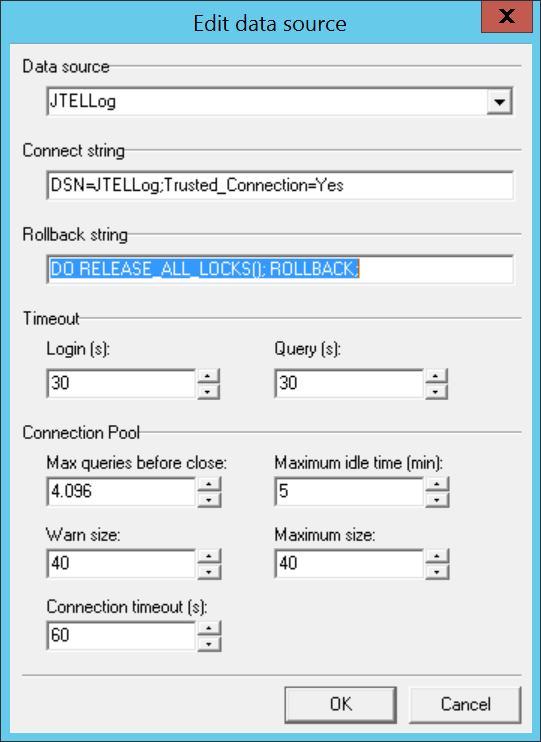
    The Rollback string for MySQL Versions 8.x (in fact MySQL 5.7) and higher has changed, and will need to be reconfigured in 8-Server. 

    The new rollback string is:

    Translations Ignore


    Code Block
    DO RELEASE_ALL_LOCKS(); ROLLBACK;


    8-Server should be restarted after making this change:

    Image Added

    Troubleshooting

    jtel Portal DB Script fails with "Failed to load caching_sha2_password authentication plugin"

    The DB scripts are being run from a different server than the updated MySQL server(s). 

    This is good! You should run them from the role STORE.

    However, you will need to update the mysql client on these machines too. Do this (change the second line for CentOS 6.x - see above for the RPM required):

    Translations Ignore


    Code Block
    yum remove mysql-community-release.noarch
    yum -y localinstall https://dev.mysql.com/get/mysql80-community-release-el7-3.noarch.rpm
    yum update mysql*


    Now run the scripts again.

    jtel Portal DB Script fails with "Duplicate Entry"

    Try running the DB script again.

    Authentication Failed with some DB Tools

    For example, earlier versions of DB Forge will fail when connecting to MySQL 8.x.

    Update the tool.

    Slave Fails to Start with Error ERROR 1872 (HY000): Slave failed to initialize relay log info structure from the repository

    The following series of commands issed in mysql might sometimes help to restart the slave, without rebuilding replication from scratch:

    Translations Ignore


    Code Block
    RESET SLAVE;
    START SLAVE IO_THREAD;
    STOP SLAVE IO_THREAD;
    RESET SLAVE;
    START SLAVE;


    Upgrade to MySQL 8.x Fails

    If the upgrade to 8.x fails, try rolling back to 5.7 as follows, and resolve the problem in 5.7 before proceeding.

    Translations Ignore


    Code Block
    # Enable 5.7
    yum-config-manager --disable mysql56-community
    yum-config-manager --enable mysql57-community
    yum-config-manager --disable mysql80-community
    
    
    # Uninstall
    yum -y remove mysql-community-server
    yum -y remove mysql-community-client
    yum -y remove mysql-community-libs
    yum -y remove mysql-community-common
    
    
    # Install
    yum -y install mysql-community-server


    Sv translation
    languagede

    Das jtel-Portalsystem geht dazu über, MySQL 8.x anstelle des älteren MySQL 5.6 zu verwenden.

    Derzeit unterstützt die neueste Version des Portals 3.15 beide Versionen von MySQL, dies ist jedoch nur eine Übergangsmaßnahme, und dies wird sich in einer kommenden Version bald ändern, so dass MySQL 8.x erforderlich ist.

    Diese Prozedur beschreibt, wie Sie das System auf MySQL 8.x aktualisieren.

    Warning
    titleCaution

    Dies ist eine non trivial Operation. Fahren Sie nur fort, wenn Sie über geeignete Rollback-Mechanismen verfügen, wie z.B. Snapshots Ihrer virtuellen Maschinen und ein Backup der Datenbank.

    ALLE INSTALLATIONEN

    • PORTAL VERSION
      • Stellen Sie sicher, dass die jtel Portal Version mindestens 3.15 ist, bevor Sie beginnen.

    • Betriebssystem
      • Stellen Sie sicher, dass das Betriebssystem mit allen Aktualisierungen auf allen mysql-Servern auf dem neuesten Stand ist.

    INSTALLATIONEN MIT REPLIKATION

    • Replication Slaves
      • Stellen Sie sicher, dass die Replikation funktioniert, bevor Sie beginnen

    • Replication Masters
      • Stellen Sie sicher, dass das binäre Protokollformat ROW und nicht MIXED oder STATEMENT ist
    • PHASE 1
      • Schließen Sie Phase 1 zunächst für alle Server ab, zuerst für die Slaves, dann für die Masters.

    • Master-Master Konfigurationen
      • Halten Sie den anderen Master vor der Aktualisierung an.
      • Stellen Sie sicher, dass beide Master 8.x sind, bevor Sie neu starten.

    Voraussetzungen

    • Das jtel-Portal muss auf die neueste Version, derzeit 3.15, aktualisiert werden.
    • Das Betriebssystem muss mit yum -y update auf den neuesten Stand gebracht werden, damit es alle aktuellen Patches enthält
    • yum-utils muss mit yum -y install yum-utils installiert werden

    Einführung

    Dies ist eine mehrstufige Operation, da das MySQL-System nicht unterstützt, dass Aktualisierungen von Versionen ausgelassen werden - um von 5.6 auf 8.0 zu wechseln, ist es erforderlich, zuerst auf 5.7 zu aktualisieren.

    Warning
    titleAchtung

    Fahren Sie erst fort, wenn die Voraussetzungen erfüllt sind. Das Verfahren WIRD NICHT FUNKTIONIEREN, wenn eine frühere Version des jtel-Portals installiert ist.

    Phase 1 - Sicherstellen, dass die bestehende Konfiguration gut ist

    Es gibt mehrere Konfigurationselemente, die in der Slave-Konfiguration eingestellt werden müssen, bevor Sie fortfahren können

    Leider wird mysql 5.7 während des Upgrade-Prozesses einen anderen Standard-Binär-Log- und Relay-Log-Dateinamen verwenden (dies ist wahrscheinlich ein Bug), es sei denn, diese Schritte werden befolgt. 

    Führen Sie dieses Verfahren für alle Slaves durch (auch für beide Master bei der Master-Master-Replikation).

    Translations Ignore


    Code Block
    # Master or slave?
    if [ -e /etc/my.cnf.d/jtel-slave.cnf ] 
    then
    MY_CNF_FILE=/etc/my.cnf.d/jtel-slave.cnf
    MASTER_UPDATE=FALSE
    fi
    if [ -e /etc/my.cnf.d/jtel-master.cnf ] 
    then
    MY_CNF_FILE=/etc/my.cnf.d/jtel-master.cnf
    MASTER_UPDATE=TRUE
    fi
    if [ ! -z MY_CNF_FILE ] 
    then
    cat <<EOFF >> $MY_CNF_FILE
    relay_log                       = mysqld-relay-bin
    relay_log_index                 = mysqld-relay-bin.index
    relay_log_info_file             = relay-log.info
    EOFF
    if [ "$MASTER_UPDATE" == "FALSE" ] 
    then
    cat <<EOFF >> $MY_CNF_FILE
    skip-log-bin
    EOFF
    fi
    fi
    MY_CNF_FILE=
    
    # Restart mysql
    systemctl restart mysqld.service


    Phase 2 - Update MySQL auf 5.7

    Denken Sie daran - beginnen Sie bei replizierten Installationen zuerst mit den Slaves. Aktualisieren Sie dann die Master, einen nach dem anderen.

    Durchführen eines sauberen Shutdowns von MySQL mit innodb_fast_shutdown auf 0

    Translations Ignore


    Code Block
    mysql -u root -p<password> --execute="SET GLOBAL innodb_fast_shutdown=0"
    mysqladmin -u root -p<password> shutdown


    Altes yum-Repository entfernen und neues yum-Repository installieren

    Entfernen Sie das alte MySQL yum-Repository.

    Translations Ignore


    Code Block
    yum remove mysql-community-release.noarch


    Als nächstes installieren Sie das neue MySQL yum-Repository mit dem Befehl, der für die verwendete Betriebssystemversion relevant ist.

    Mit dem folgenden Befehl können Sie das verwendete Betriebssystem bestimmen:

    Translations Ignore


    Code Block
    cat /etc/centos-release


    Für CentOS 7:

    Translations Ignore


    Code Block
    yum -y localinstall https://dev.mysql.com/get/mysql80-community-release-el7-3.noarch.rpm


    Für CentOS 6:

    Translations Ignore


    Code Block
    yum -y localinstall https://dev.mysql.com/get/mysql80-community-release-el6-3.noarch.rpm


    Update MySQL Server auf 5.7

    Dazu gehört das Bereinigen der Versionlock-Tabelle und das Aktivieren des 5.7 Update-Pfades.

    Beachten Sie, dass der Befehl yum ohne die Option -y ausgeführt wird. Sie sollten prüfen, was das System vorhat, bevor Sie diesen Schritt bestätigen.

    Translations Ignore


    Code Block
    # Versionlock-Tabelle bereinigen
    yum versionlock clear
    
    # Enable 5.7 
    yum-config-manager --disable mysql56-community
    yum-config-manager --enable mysql57-community
    yum-config-manager --disable mysql80-community
    
    # Update
    yum update


    Starten Sie den MySQL-Server (OHNE REPLIKATION FÜR SLAVES und MASTER-MASTER)

    Starten Sie den mysql Server ohne Replikation.

    Translations Ignore


    Code Block
    titleCentOS 7.x
    # Start - IMPORTANT - WITHOUT REPLICATION
    systemctl set-environment MYSQLD_OPTS="--skip-slave-start"
    systemctl start mysqld.service


    Translations Ignore


    Code Block
    titleCentOS 6.x
    # Start - IMPORTANT - WITHOUT REPLICATION
    mysqld_safe --skip-slave-start &


    mysql_upgrade ausführen

    Entweder ändern Sie das Passwort im folgenden Befehl, oder Sie verwenden einfach die Option -p, ohne ein Passwort anzugeben, und geben es an der Eingabeaufforderung ein.

    Translations Ignore


    Code Block
    mysql_upgrade -u root -p<password>


    Überprüfen Sie die Ausgabe aus dieser Phase, bevor Sie fortfahren - wenn dieses Verfahren nicht behebbare Fehlermeldungen anzeigt, dann ist das Verfahren schief gelaufen, und Sie müssen hier ein Rollback durchführen.

    Starten Sie als nächstes den MySQL-Server neu.

    Translations Ignore


    Code Block
    titleCentOS 7.x
    systemctl stop mysqld.service
    systemctl set-environment MYSQLD_OPTS=
    systemctl start mysqld.service


    Translations Ignore


    Code Block
    titleCentOS 6.x
    service mysqld stop
    service mysqld start


    Prüfen, ob Datenbank und Replikation und Version in Ordnung sind

    Translations Ignore


    Code Block
    mysql -u root -p<password> -e "SHOW SLAVE STATUS\G SELECT VERSION();"


    Fahren Sie nur fort, wenn keine Fehler gefunden werden.

    Warning
    titleHinweis

    Das jtel-Portal ist NICHT mit MySQL 5.7 kompatibel. - Sie müssen den Upgrade-Pfad auf 8.x an dieser Stelle fortsetzen.

    Aktualisieren Sie ALLE Server auf 5.7, bevor Sie fortfahren.

    Phase 3 - Update MySQL auf 8.0

    Warning
    titleAchtung

    Wenn Sie nach diesem Punkt fortfahren, ohne dass Version 3.15 oder später des jtel-Portals installiert ist, zerstört die Datenbank, und ein Rollback ist erforderlich.

    Denken Sie daran - erst die Slaves, dann die Master. Einer nach dem anderen.

    Durchführen eines sauberen Shutdowns von MySQL mit innodb_fast_shutdown auf 0

    Translations Ignore


    Code Block
    mysql -u root -p<password> --execute="SET GLOBAL innodb_fast_shutdown=0"
    mysqladmin -u root -p<password> shutdown


    8.0-Repositorys aktivieren und den Server aktualisieren

    Beachten Sie, dass der Befehl yum ohne die Option -y ausgführt wird. Sie sollten prüfen, was das System vorhat, bevor Sie diesen Schritt bestätigen.

    Translations Ignore


    Code Block
    # Enable 8.x
    yum-config-manager --disable mysql56-community
    yum-config-manager --disable mysql57-community
    yum-config-manager --enable mysql80-community
    
    # Update to 8.x
    yum update


    Starten Sie den MySQL-Server

    Starten Sie den mysql Server.

    Translations Ignore


    Code Block
    titleCentOS 7.x
    systemctl start mysqld.service


    Translations Ignore


    Code Block
    titleCentOS 6.x
    service mysqld start


    Beachten Sie, dass das Starten des mysql-Servers einige Zeit dauern kann. Es mag sogar so aussehen, als sei es aufgehangen, aber warten Sie ein paar Minuten und lassen Sie es fertigstellen.

    Warning
    titlemysql_upgrade

    mysql_upgrade wird automatisch von allen aktuellen 8.x-Versionen von MySQL Server ausgeführt.

    Der Output von mysql_upgrade befindet sich in /var/log/mysqld.log und Fehler werden in /var/log/messages gefunden

    Überprüfen Sie diese Dateien auf Fehler.

    Prüfen, ob Datenbank und Replikation und Version in Ordnung sind

    Translations Ignore


    Code Block
    mysql -u root -p<password> -e "SHOW SLAVE STATUS\G SELECT VERSION();"


    Phase 4 - Andere Komponenten konfigurieren

    Portal

    Führen Sie das Portal-Aktualisierungsskript erneut aus. Dadurch werden die Skripte für MySQL 8.x optimiert.

    Translations Ignore


    Code Block
    sudo /home/jtel/shared/JTELCarrierPortal/Update/update_release.sh


    JBOSS Server

    Entweder: Neue Version von JBOSS Server installieren

    Sie können einfach die neue Version des JBOSS-Servers installieren, mindestens jboss-as-7.1.1.FINAL.14.tar.gz von cdn.jtel.de.

    Diese enthält die erforderlichen Komponenten, erfordert jedoch, dass die Dateien hazelcast.xml und standalone-full.xml aktualisiert werden, wie bei der Installation des Webservers beschrieben, siehe hier: Role WEB

    Oder: Updaten des JBOSS-Servers

    Der JBOSS-Server benötigt einen neuen Konnektor, um sich mit MySQL 8.x zu verbinden.

    Diese kann mit dem folgenden Befehl (z.B. von /home/jtel/shared/JTELCarrierPortal/Update aus ausführen) als jtel-Benutzer auf die JBOSS-Serverinstanz kopiert werden:

    Translations Ignore


    Code Block
    ./update_jboss.sh


    Standalone-full.xml ändern

    Die Konfigurationsdatei standalone-full.xml erfordert einige Änderungen.

    Eine neue Verbindungseigenschaft muss zu den Datasource-Konfigurationen für MySQL hinzugefügt werden. Dies muss zu den Datasource-Konfigurationen für JTELWeb, JTELWebSlave, JTELStats, JTELLog und JTELReports hinzugefügt werden.

    Siehe das folgende Beispiel:

    Translations Ignore


    Code Block
    ...
    <datasource jndi-name="java:jboss/datasources/JTELLog" pool-name="JTELLog" enabled="true">
        <connection-url>jdbc:mysql://testdb2:3306/JTELLog</connection-url>
            #
            # THIS SECTION NEEDS TO BE ADDED
            #
            <connection-property name="useSSL">
                false
            </connection-property>
    ...


    Stellen Sie im Abschnitt drivers sicher, dass die Zeile driver class für den mysql-Treiber enthalten ist.

    Dies wird nur bei sehr alten jboss-Installationen fehlen. Wenn dies der Fall ist, ist es vielleicht besser, den jboss-Server komplett auf eine neue Version zu aktualisieren..

    Translations Ignore


    Code Block
    ...
    <drivers>
        <driver name="com.mysql" module="com.mysql">
            #
            # MAKE SURE THIS NEXT LINE IS PRESENT.
            #
            <driver-class>com.mysql.jdbc.Driver</driver-class>
            ...               


    8-Server-ODBC-Verbindungen rekonfigurieren

    Der Rollback-String für MySQL-Versionen 8.x (eigentlich MySQL 5.7) und höher hat sich geändert und muss in 8-Server neu konfiguriert werden. 

    Die neue Rollback-String ist:

    Translations Ignore


    Code Block
    DO RELEASE_ALL_LOCKS(); ROLLBACK;


    8-Server sollte nach dieser Änderung neu gestartet werden:

    Image Modified

    ...

    Fehlerbehebung

    jtel Portal DB-Skript schlägt fehl mit "Failed to load caching_sha2_password authentication plugin"

    Die DB-Skripte werden von einem anderen Server als dem/den aktualisierten MySQL-Server(n) ausgeführt. 

    Das ist gut! Sie sollten sie von der Rolle STORE aus ausführen.

    Allerdings müssen Sie auch auf diesen Maschinen den mysql-Client aktualisieren. Tun Sie dies (ändern Sie die zweite Zeile für CentOS 6.x - siehe oben für die erforderliche RPM):

    Translations Ignore


    Code Block
    yum remove mysql-community-release.noarch
    yum -y localinstall https://dev.mysql.com/get/mysql80-community-release-el7-3.noarch.rpm
    yum update mysql*


    Führen Sie nun die Skripte erneut aus.

    jtel Portal DB-Skript schlägt fehl mit "Duplicate Entry"

    Versuchen Sie, das DB-Skript erneut auszuführen.

    Authentifizierung bei einigen DB-Tools fehlgeschlagen

    Beispielsweise schlagen frühere Versionen von DB Forge beim Verbinden mit MySQL 8.x fehl.

    Aktualisieren Sie das Tool.

    Sklave startet nicht mit Fehler "ERROR 1872 (HY000): Slave failed to initialize relay log info structure from the repository"

    Die folgende Reihe von Befehlen, die in mysql ausgeführt werden, kann manchmal helfen, den Slave neu zu starten, ohne die Replikation von Grund auf neu aufzubauen:

    Translations Ignore


    Code Block
    RESET SLAVE;
    START SLAVE IO_THREAD;
    STOP SLAVE IO_THREAD;
    RESET SLAVE;
    START SLAVE;


    Upgrade auf MySQL 8.x schlägt fehl

    Wenn das Upgrade auf 8.x fehlschlägt, versuchen Sie, wie folgt auf 5.7 zurückzusetzen und das Problem in 5.7 zu lösen, bevor Sie fortfahren.

    Translations Ignore


    Code Block
    # Enable 5.7
    yum-config-manager --disable mysql56-community
    yum-config-manager --enable mysql57-community
    yum-config-manager --disable mysql80-community
    
    
    # Uninstall
    yum -y remove mysql-community-server
    yum -y remove mysql-community-client
    yum -y remove mysql-community-libs
    yum -y remove mysql-community-common
    
    
    # Install
    yum -y install mysql-community-server