
| Sv translation | |||||||||||||||||||||||||||||||||||||||||||||||||||||||||||
|---|---|---|---|---|---|---|---|---|---|---|---|---|---|---|---|---|---|---|---|---|---|---|---|---|---|---|---|---|---|---|---|---|---|---|---|---|---|---|---|---|---|---|---|---|---|---|---|---|---|---|---|---|---|---|---|---|---|---|---|
| |||||||||||||||||||||||||||||||||||||||||||||||||||||||||||
jtel STARFACE v62 Service - LinuxThe jtel STARFACE v62 Service must be installed on one of the telephony server machines. Copy FilesCopy the following directory to the telephony server:
Check ConfigurationCheck the configuration file jtelStarface6v2SOAPWindowsService.exe.config if any changes are required. The most likely changes would be to the sections:
Configure FirewallIf the windows firewall is active, add a rule to allow http traffic into the web service. Use the following in a cmd window as administrator:
Note, if the STARFACE is in a different network, you will need to change to edge=yes and configure a public remote IP-Adress in the SIP and RTP firewall rules to provide access. Install as ServiceUsing a command window, as Administrator: Translations Ignore |
Trunk and Trunk Group ConfigurationLogin as sysadmin to the jtel Portal. Configure TrunksUse System Settings ... Trunks to configure a trunk for each 8-Server machine. Note, the machine ID is set in the 8-Server configuration (usually the last part of the IP address of the machine).
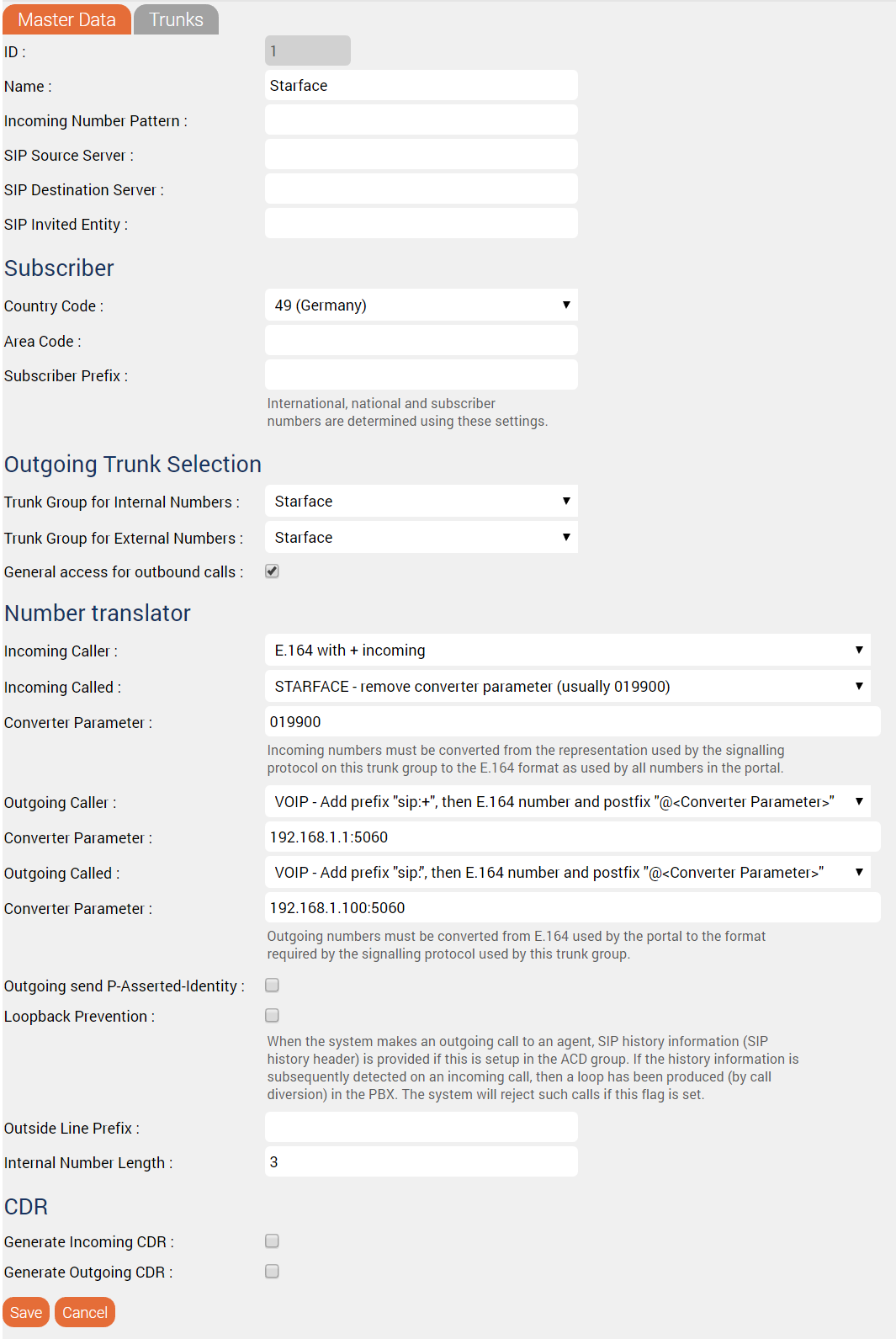
Configure Trunk GroupsCreate a new trunk group for each STARFACE PBX. The following parameters are required.
Add the trunk created above for the PBX to the Trunks page. DO NOT FORGET THIS, OR IT WILL NOT WORK! See the screenshot below for an example configuration:
Configure Service NumbersService-Numbers are configured as fully qualified E.164 numbers. Agent Telephone Numbers / PBX Internal DestinationsAgent telephone numbers are configured only with the number of the internal extension, not as fully qualified E.164 numbers. | ||||||||||||||||||||||||||||||||||||||||||||||||||||||||||
| Sv translation | |||||||||||||||||||||||||||||||||||||||||||||||||||||||||||
| |||||||||||||||||||||||||||||||||||||||||||||||||||||||||||
Configure SOAP UserCreate the SOAP User as an agent in jtel and give the username and password to the starface provider for Module configuration Old - WindowsCopy FilesCopy the following directory to the telephony server
service STARFACE v6.2 jtelLe service jtel STARFACE v6.2 doit être installé sur l'une des machines du serveur de téléphonie. Copier les fichiersCopiez le répertoire suivant sur le serveur de téléphonie :
Vérifiez la configuration :Check ConfigurationCheck the configuration file Vérifiez le fichier de configuration jtelStarface6v2SOAPWindowsService.exe.config si des changements sont nécessaires. Les changements les plus probables porteraient sur les articles :
Configurer le pare-feuSi le pare-feu Windows est actif, ajoutez une règle pour autoriser le trafic http dans le service web. Utilisez ce qui suit dans une fenêtre cmd comme administrateur: Translations Ignore | if any changes are required. The most likely changes would be to the sections:
Install as ServiceUsing a command window, as Administrator
Notez que si la STARFACE fait partie d'un autre réseau, vous devrez passer à edge=yes. Installer en tant que serviceEn utilisant une fenêtre de commande, comme Administrateur:
Trunc et Configuration des groupes de troncConnectez-vous en tant que sysadmin au portail de jtel. Configurer les troncsSystème d'utilisation Paramètres ... Troncs pour configurer un tronc pour chaque machine à 8 serveurs. Notez que l'ID de la machine est défini dans la configuration à 8-server (généralement la dernière partie de l'adresse IP de la machine).
Configurer les groupes de troncsCréer un nouveau groupe de tronc pour chaque STARFACE PBX. Les paramètres suivants sont requis. | ||||||||||||||||||||||||||||||||||||||||||||||||||||||||||
| Paramètre | Valeur | ||||||||||||||||||||||||||||||||||||||||||||||||||||||||||
| Nom | Par exemple STARFACE | ||||||||||||||||||||||||||||||||||||||||||||||||||||||||||
| Code du pays | Sélectionnez le bon code de pays | ||||||||||||||||||||||||||||||||||||||||||||||||||||||||||
| Sélection du tronc sortant | Groupe de travail pour les numéros internes | Réglé sur le même groupe de troncs (explicitement) | |||||||||||||||||||||||||||||||||||||||||||||||||||||||||
| Groupe de tronc pour les numéros externes | Réglé sur le même groupe de troncs (explicitement) | ||||||||||||||||||||||||||||||||||||||||||||||||||||||||||
| Accès général pour les appels sortants | Ne cochez cette option que s'il s'agit d'une installation pour un seul client. | ||||||||||||||||||||||||||||||||||||||||||||||||||||||||||
| Traducteur du numéro | Appelant entrant | E.164 avec + entrant | |||||||||||||||||||||||||||||||||||||||||||||||||||||||||
| Appelé entrant | STARFACE - supprimer le paramètre du convertisseur (généralement 019900) | ||||||||||||||||||||||||||||||||||||||||||||||||||||||||||
| Paramètres du convertisseur | 019900 | ||||||||||||||||||||||||||||||||||||||||||||||||||||||||||
| Appel sortant | VOIP - Ajouter le préfixe "sip:+", puis le numéro E.164 et le préfixe postal "@<Converter Parameter> | ||||||||||||||||||||||||||||||||||||||||||||||||||||||||||
| Paramètres du convertisseur | <IP_Address_8-Server>:5060 Par exemple: 192.168.1.1:5060 | ||||||||||||||||||||||||||||||||||||||||||||||||||||||||||
| Appelé sortant | VOIP - Ajouter le préfixe "sip :", puis le numéro E.164 et le postfix "@<Converter Parameter>". | ||||||||||||||||||||||||||||||||||||||||||||||||||||||||||
| Paramètres du convertisseur | <IP_Address_STARFACE>:5060 Par exemple: 192.168.1.100:5060 | ||||||||||||||||||||||||||||||||||||||||||||||||||||||||||
| Longueur du numéro interne | Fixer la longueur maximale des numéros d'extension PBX internes, par exemple 3 | ||||||||||||||||||||||||||||||||||||||||||||||||||||||||||

| Sv translation | |||||||||||||||||||||||||||||||||||||||||||||||||||||
|---|---|---|---|---|---|---|---|---|---|---|---|---|---|---|---|---|---|---|---|---|---|---|---|---|---|---|---|---|---|---|---|---|---|---|---|---|---|---|---|---|---|---|---|---|---|---|---|---|---|---|---|---|---|
| |||||||||||||||||||||||||||||||||||||||||||||||||||||
jtel STARFACE v6.2 DienstDer jtel STARFACE v6.2 Service muss auf einem der Telefonie-Server-Maschinen installiert sein. Dateien KopierenKopieren Sie das folgende Verzeichnis auf den Telefonieserver:
KonfigurationÜberprüfen Sie die Konfigurationsdatei jtelStarface6v2SOAPWindowsService.exe.config, ob Änderungen erforderlich sind. Am wahrscheinlichsten sind Änderungen an den Abschnitten:
Firewall KonfigurierenWenn die Windows-Firewall aktiv ist, fügen Sie eine Regel hinzu, die http-Verkehr für den Webdienst zulässt. Verwenden Sie in einem cmd-Fenster als Administrator den folgenden Befehl:
Wenn sich das STARFACE in einem anderen Netzwerk befindet, müssen Sie auf edge=yes umstellen und eine öffentliche Remote-IP-Adresse in den SIP- und RTP-Firewall-Regeln konfigurieren, um den Zugang zu ermöglichen. Als Dienst installierenVerwenden Sie ein Befehlsfenster als Administrator:
Trunk und Trunk-Gruppen KonfigurationMelden Sie sich als Systemadministrator am jtel Portal an. Trunks KonfigurierenVerwenden Sie Systemeinstellungen → Trunks, um eine Leitung für jeden 8-Server-Rechner zu konfigurieren. Beachten Sie, dass die MachineID in der 8-Server-Konfiguration festgelegt wird (normalerweise der letzte Teil der IP-Adresse des Rechners).
Configure Trunk GroupsLegen Sie für jede STARFACE Telefonanlage eine neue Leitungsgruppe an. Die folgenden Parameter sind erforderlich.
Add the trunk created above for the PBX to the Trunks page. DO NOT FORGET THIS, OR IT WILL NOT WORK! See the screenshot below for an example configuration:
Configure Service NumbersService-Numbers are configured as fully qualified E.164 numbers. Agent Telephone Numbers / PBX Internal DestinationsAgent telephone numbers are configured only with the number of the internal extension, not as fully qualified E.164 numbers. | |||||||||||||||||||||||||||||||||||||||||||||||||||||