Versions Compared

Key

  • This line was added.
  • This line was removed.
  • Formatting was changed.
Comment: Removed translated content for 'fr'
Sv translation
languageen

Implementation

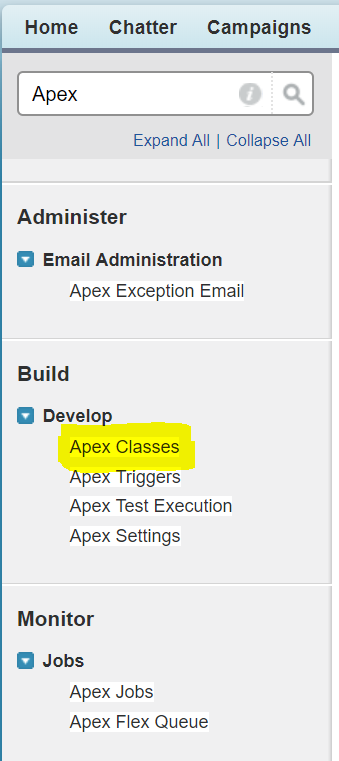
Classic

To create a new Apex class, access Setup in SalesForce, and type in "Apex" in the quick search box. 

Select "Build ... Develop ... Apex Classes".

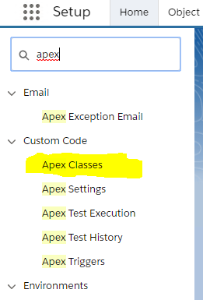
Lightning

Access Setup, and search for "Apex" in the search box.

Classic and Lightning

Create a new class. Add the following code:


Translations Ignore


Code Block
languagejava
titleSample Apex getCallerInformation
@RestResource(urlMapping='/jtelACD/getCallerInformation')
global with sharing class JTELACD_GetCallerInformation {
    @HttpGet
    global static String doGet() {
        RestRequest req = RestContext.request;
        RestResponse res = RestContext.response;

        // This is how to access URLParams if required
        // List<String> URLParams = req.requestURI.split('/');
        // Example: ["","jtelACD","getCallerInformation"]

        // Extract the request parameters
        String CallerID = req.params.get('CallerID');
        String ServiceNumber = req.params.get('ServiceNumber');
        String ServiceName = req.params.get('ServiceName');
        // From release 3.25 - 2021-07-02 and upwards
        String Function = req.params.get('Function');
        String UserData = req.params.get('UserData');
        String UserData2 = req.params.get('UserData2');
        String UserData3 = req.params.get('UserData3');

        // Specifying a Function is intended to allow the developer to perform different types of query. 
        // As an example, we just return the data back if a function is specified.
        // In a real world case, a query for example to search for and return a ticket, contract or some other record would be performed.
        if( Function != null && Function != '' ) {
            JSONGenerator gen = JSON.createGenerator( true );
            gen.writeStartObject();
            gen.writeStringField( 'CallerID', CallerID );
            gen.writeStringField( 'ServiceNumber', ServiceNumber );
            gen.writeStringField( 'ServiceName', ServiceName );
            gen.writeStringField( 'Function', Function );
            gen.writeStringField( 'UserData', UserData );
            gen.writeStringField( 'UserData2', UserData2 );
            gen.writeStringField( 'UserData3', UserData3 );
            gen.writeEndObject();

            return gen.getAsString();
        }
        
        // Perform SOSL Query over contacts and leads, searching for the phone number with *wildcards*
        String soslSearchString = '*' + CallerID + '*';
        List<List<SObject>> searchList = [FIND :soslSearchString IN ALL FIELDS
                                          RETURNING 
                                          Contact,
                                          Lead];        
        
        List<Contact> contacts = ( (List<Contact>) searchList[0] );
        List<Lead> leads       = ( (List<Lead>) searchList[1] );
        
        // Multple hits?
        if( contacts.size() + leads.size() > 1 )
        {
            // Multiple hits
            res.statusCode = 300;
            return null;
        }
        
        if( contacts.size() > 0 )
        {
            // Query for exact contact
            String Id = (String) contacts.get(0).get('Id');
            Set<String> fieldSet = schema.describeSObjects(new String[] { 'Contact' } )[0].fields.getMap().keyset();
            List<String> fieldList = new List<String>( fieldSet );
            String query = 'SELECT ' + String.join( fieldList, ',' ) + ' FROM Contact WHERE Id = \'' + Id + '\'';
            Contact contact = Database.query( query );
            // 200 OK will be returned by default
            return JSON.serialize( contact );
        }
        
        if( leads.size() > 0 )
        {
            // Query for exact lead
            String Id = (String) leads.get(0).get('Id');
            Set<String> fieldSet = schema.describeSObjects(new String[] { 'Lead' } )[0].fields.getMap().keyset();
            List<String> fieldList = new List<String>( fieldSet );
            String query = 'SELECT ' + String.join( fieldList, ',' ) + ' FROM Lead WHERE Id = \'' + Id + '\'';
            Lead lead = Database.query( query );
            // 200 OK will be returned by default
            return JSON.serialize( lead );
        }

        // Nothing found
        res.statusCode = 404;
        return null;
    }
}


CURL Test

First of all, obtain an OAUTH Token, see Testing with CURL.

The following CURL command can be used to test this API:

Translations Ignore


Code Block
titleCURL - getCallerInformation Test
curl.exe --silent -i -X GET --header "Authorization: Bearer <OAUTH_TOKEN>" --header "Connection: Close" "https://<SALES_FORCE_INSTANCE_URL>/services/apexrest/jtelACD/getCallerInformation?CallerID=4989461495000&ServiceNumber=4980012345678&ServiceName=test"
Sv translation
languagede

Status
colourRed
titleThis page is only available in English

@RestResource(urlMapping='/jtelACD/getCallerInformation') global with sharing class JTELACD_GetCallerInformation { @HttpGet global static String doGet() { RestRequest req = RestContext.request; RestResponse res = RestContext.response; // This is how to access URLParams if required // List<String> URLParams = req.requestURI.split('/'); // Example: ["","jtelACD","getCallerInformation"] // Extract the request parameters String CallerID = req.params.get('CallerID'); String ServiceNumber = req.params.get('ServiceNumber'); String ServiceName = req.params.get('ServiceName'); // Perform SOSL Query over contacts and leads, searching for the phone number with *wildcards* String soslSearchString = '*' + CallerID + '*'; List<List<SObject>> searchList = [FIND :soslSearchString IN ALL FIELDS RETURNING Contact, Lead]; List<Contact> contacts = ( (List<Contact>) searchList[0] ); List<Lead> leads = ( (List<Lead>) searchList[1] ); // Multple hits? if( contacts.size() + leads.size() > 1 ) { // Multiple hits res.statusCode = 300; return null; } if( contacts.size() > 0 ) { // Query for exact contact String Id = (String) contacts.get(0).get('Id'); Set<String> fieldSet = schema.describeSObjects(new String[] { 'Contact' } )[0].fields.getMap().keyset(); List<String> fieldList = new List<String>( fieldSet ); String query = 'SELECT ' + String.join( fieldList, ',' ) + ' FROM Contact WHERE Id = \'' + Id + '\''; Contact contact = Database.query( query ); // 200 OK will be returned by default return JSON.serialize( contact ); } if( leads.size() > 0 ) { // Query for exact lead String Id = (String) leads.get(0).get('Id'); Set<String> fieldSet = schema.describeSObjects(new String[] { 'Lead' } )[0].fields.getMap().keyset(); List<String> fieldList = new List<String>( fieldSet ); String query = 'SELECT ' + String.join( fieldList, ',' ) + ' FROM Lead WHERE Id = \'' + Id + '\''; Lead lead = Database.query( query ); // 200 OK will be returned by default return JSON.serialize( lead ); } // Nothing found res.statusCode = 404; return null; } }

The following CURL command can be used to test this API with the additional parameters from Release 3.25 - 2021-07-02 and upwards:


Sv translation
languagefr
Translations Ignore
Code Block
languagejava
title
Translations Ignore


Code Block
titleCURL - getCallerInformation Test
curl.exe --silent -i -X GET --header "Authorization: Bearer <OAUTH_TOKEN>" --header "Connection: Close" "https://<SALES_FORCE_INSTANCE_URL>/services/apexrest/jtelACD/getCallerInformation?CallerID=4989461495000&ServiceNumber=4980012345678&ServiceName=test&Function=testFunction&UserData=testUserData&UserData2=testUserData2&UserData3=testUserData3"


Sv translation
languagede

Status
colourRed
titleThis page is only available in English