
| Sv translation | ||||||||||||||||||||||||||||||||||||||||||||||||
|---|---|---|---|---|---|---|---|---|---|---|---|---|---|---|---|---|---|---|---|---|---|---|---|---|---|---|---|---|---|---|---|---|---|---|---|---|---|---|---|---|---|---|---|---|---|---|---|---|
| ||||||||||||||||||||||||||||||||||||||||||||||||
A normal operation of a jtel solution is considered among other variables if:
This can be examined in detail as follows. Examination StorageRedundant StorageTesting that DRBD is synchronisedOn one of the STORE, check if the DRBD is synchronised:
Expected output - DRBD is primary/primary
Determine which STORE is active.
Check on the active STORE if /srv/jtel/shared is mounted
Expected output: Output with among others the following directories:
Alle StorageCheck if the smb service is running (with redundancy to the active STORE):
From any other machine, check access to the storageFrom another machine (except STORE itself), either:
Or from the Windows machine, open an Explorer to the When error:
Check database replicationOn all database slaves, with redundancy, also on both master databases: Login to mysql
Check slave status
The most important points are:
Example output:
When error
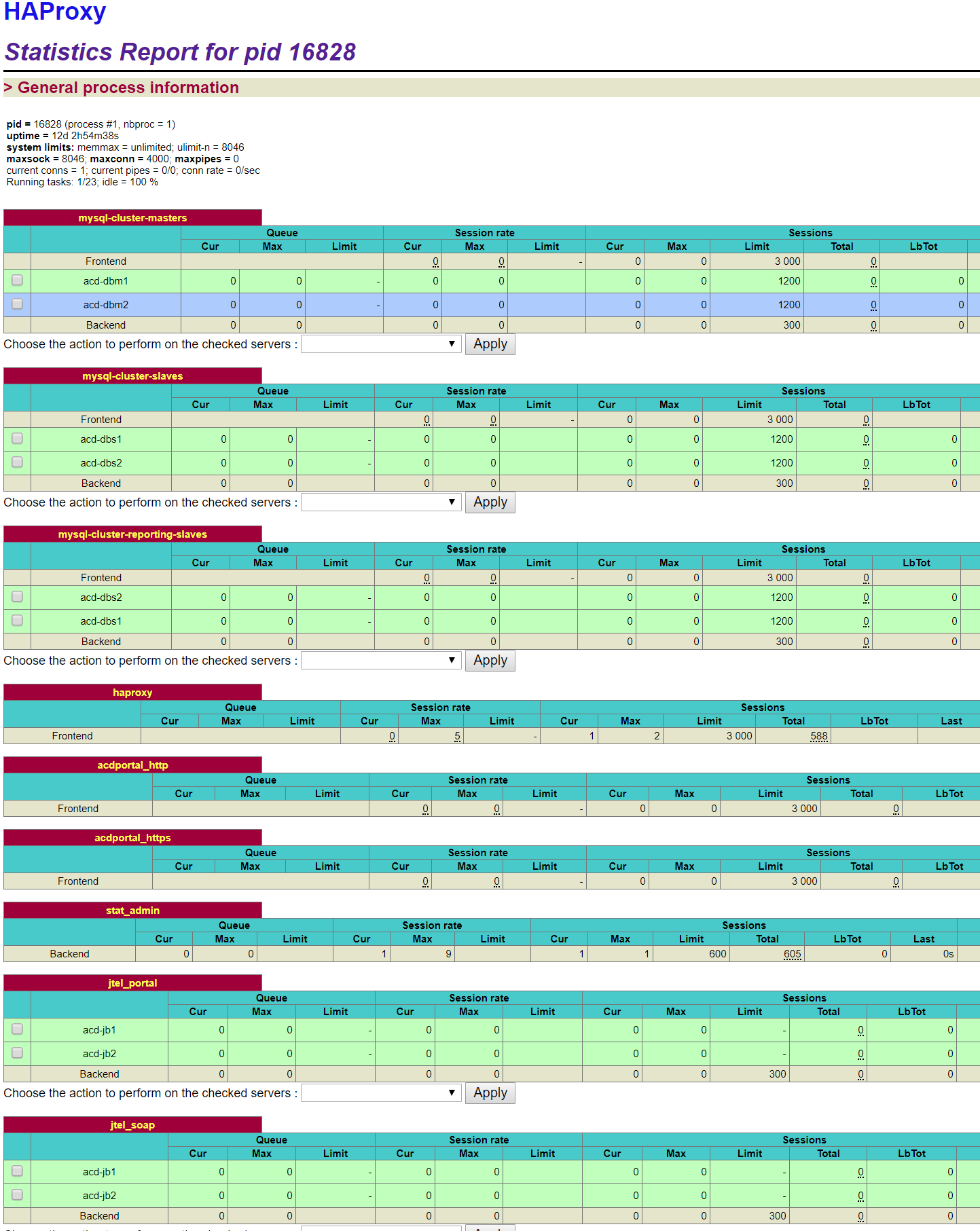
Testing load balancers and web serversTesting load balancerThe basic accessibility of the web server as well as the function of the load balancer can be checked via the haproxy Stats website. The access takes place via: http://acd-lb:7777with indication of user name and password. The screenshot shows a sample output for a system with:
The services should be green except for the 2nd database master, which is shown in light blue, as this server is configured as a backup for the first database master.
When errorCheck if the haproxy service is started. For redundancy: check cluster status with:
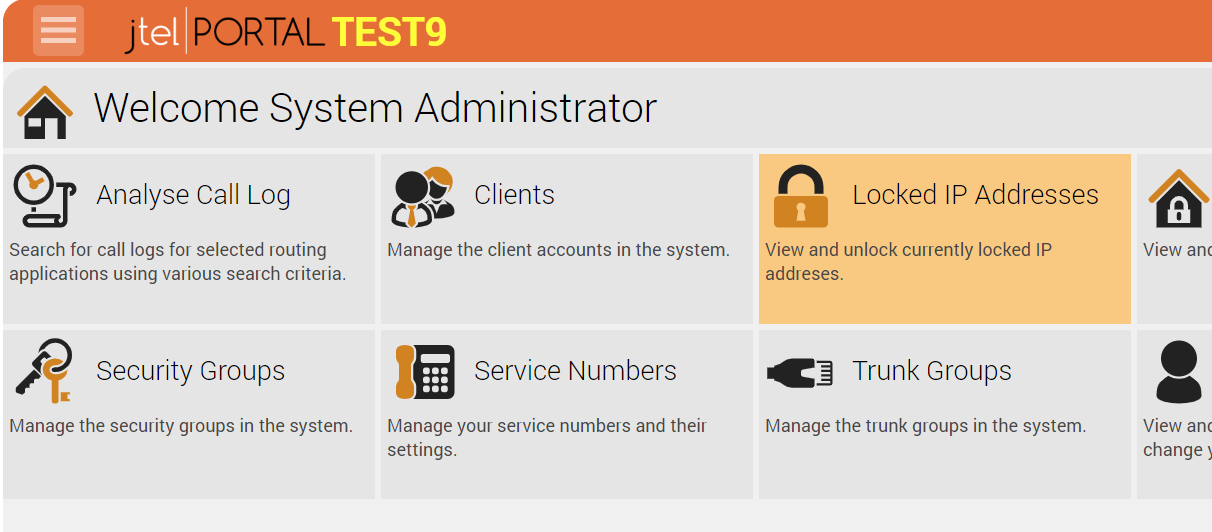
and take appropriate measures. Testing web serverThe web servers can be checked individually for function by accessing and logging on to the jtel system, for example as sysadmin. The following URL applies to https: https://acd-lb/adminAfter successful login the portal main page of the system administrator should be visible, here an example output:
When errorRestart single web server with:
Testing TelephonyThe telephony services are either:
In a standard case (with user login), the following applications are started:
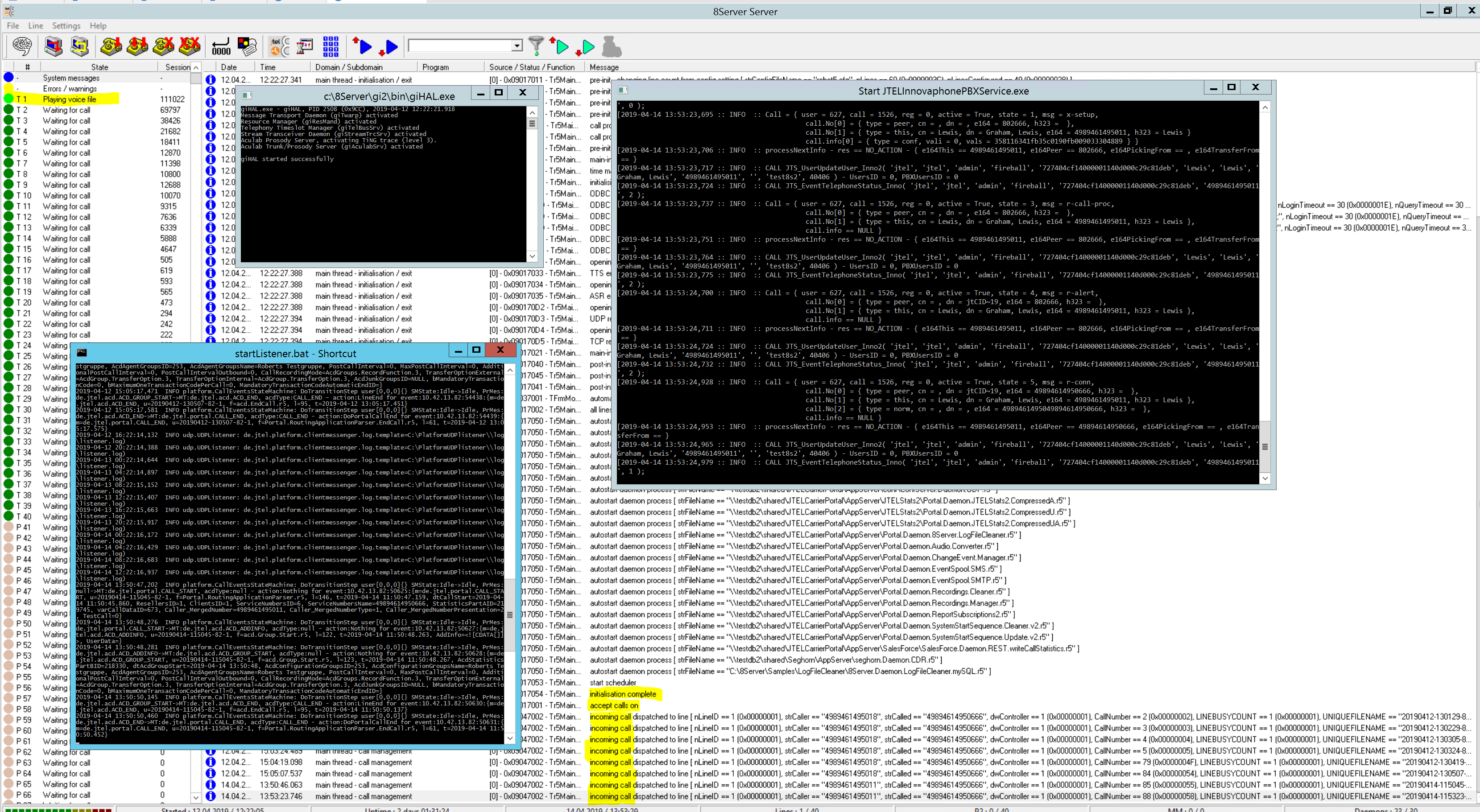
Note: depending on the installation, a PBX connector may also be started. Normal readiness and processing is shown in the following screenshot. Note the light green active line and the system messages in yellow. The following services are visible:
When errorClose all applications and restart them via the autostart group. Or reboot the system. |
| Sv translation | ||
|---|---|---|
| ||
Ein normaler Betrieb einer jtel Lösung liegt unter anderen vor wenn:
|
...
|
...
Dies kann im Einzelnen wie folgt geprüft werden. Prüfung StorageRedundanter StoragePrüfung, dass DRBD syncrhon istAuf einer der STORE, prüfen ob das DRBD syncrhon ist:
Erwartete Ausgabe - DRBD ist primary/primary:
|
...
|
...
|
...
Feststellung, welcher STORE aktiv ist.
Auf den aktiven STORE prüfen ob /srv/jtel/shared gemountet ist
Erwartete Ausgabe: Ausgabe mit unter Anderen folgende Verzeichnisse:
Alle StoragePrüfen ob der smb dienst läuft (bei Redundanz auf den aktiven STORE):
|
...
|
...
|
...
|
...
|
...
|
...
|
...
Von einer beliebigen anderen Maschine, den Zugriff auf das Storage prüfenVon einer anderen Maschine (ausser STORE selbst), entweder:
Oder von der Windows Maschine, einen Explorer auf das Verzeichnis \\acd-store\shared öffnen. Bei Fehler
Prüfung DatenbankreplikationAuf allen Datenbank Slaves, bei Redundanz, auch auf beide Master Datenbanken: Auf mysql anmelden
Slave Status prüfen
Wichtigste Stellen sind:
Beispielausgabe:
Bei Fehler
Prüfung Loadbalancer und WebserverPrüfung LoadbalancerDie grundsätzliche Erreichbarkeit der Webserver sowie Funktion des Load-Balancers kann über den haproxy Stats-Webseite geprüft werden. Der Zugriff erfolgt über: http://acd-lb:7777Mit Angabe vom Benutzernamen und Passwort. Im Screenshot ist eine Beispielausgabe für ein System mit:
abgebildet. Die Dienste sollten grün sein, bis auf den 2. Datenbankmaster, der Hellblau abgebildet ist, da dieser Server als Backup für den ersten Datenbankmaster konfiguriert ist.
Bei FehlerPrüfen ob der haproxy Dienst gestartet ist. Bei Redundanz: prüfung Cluster Status mit:
und entsprechende Maßnahmen ergreifen. Prüfung WebserverDie Webserver können einzeln auf Funktion geprüft werden, indem das Anmelden am jtel System aufgerufen und durchgeführt wird, beispielsweise als sysadmin. Folgende URL gilt für https: https://acd-lb/adminNach erfolgter Login sollte die Portal-Hauptseite des Systemadministrators sichtbar sein, hier eine Beispielausgabe:
Bei FehlerEinzelner Webserver neutstarten mit:
Prüfung TelefonieDie Telefoniedienste sind entweder:
Im Normalfall (mit Benutzeranmeldung), werden folgende Anwendungen gestartet:
Beachte: je nach Installation, wird ggf. auch ein PBX-Connector mit gestartet. Eine normale Bereitschaft, sowie Verarbeitung, wird im folgenden Screenshot dargestellt. Beachten Sie die hellgrüne aktive Leitung, sowie die Systemmeldungen in Gelb. Folgende Dienste sind sichtbar:
Bei FehlerSämtliche Anwendungen schließen, und über die Autostartgruppe neu starten. Oder das System neu booten. |