
Overview
The Live Agent functionality feature in jtel Portal enhances makes call handling better by integrating using AI -powered live transcription, sentiment analysis, entity extraction, and real-time agent assistance. This feature enables to transcribe live calls, extract important information, analyze sentiment* and provide real-time help to agents. This feature helps supervisors and agents to process deal with conversations more efficiently with by using AI support.
Features
Live Transcription
Real-time transcription of ongoing calls using supported ASR (Automatic Speech Recognition) speech to text (STT) engines.
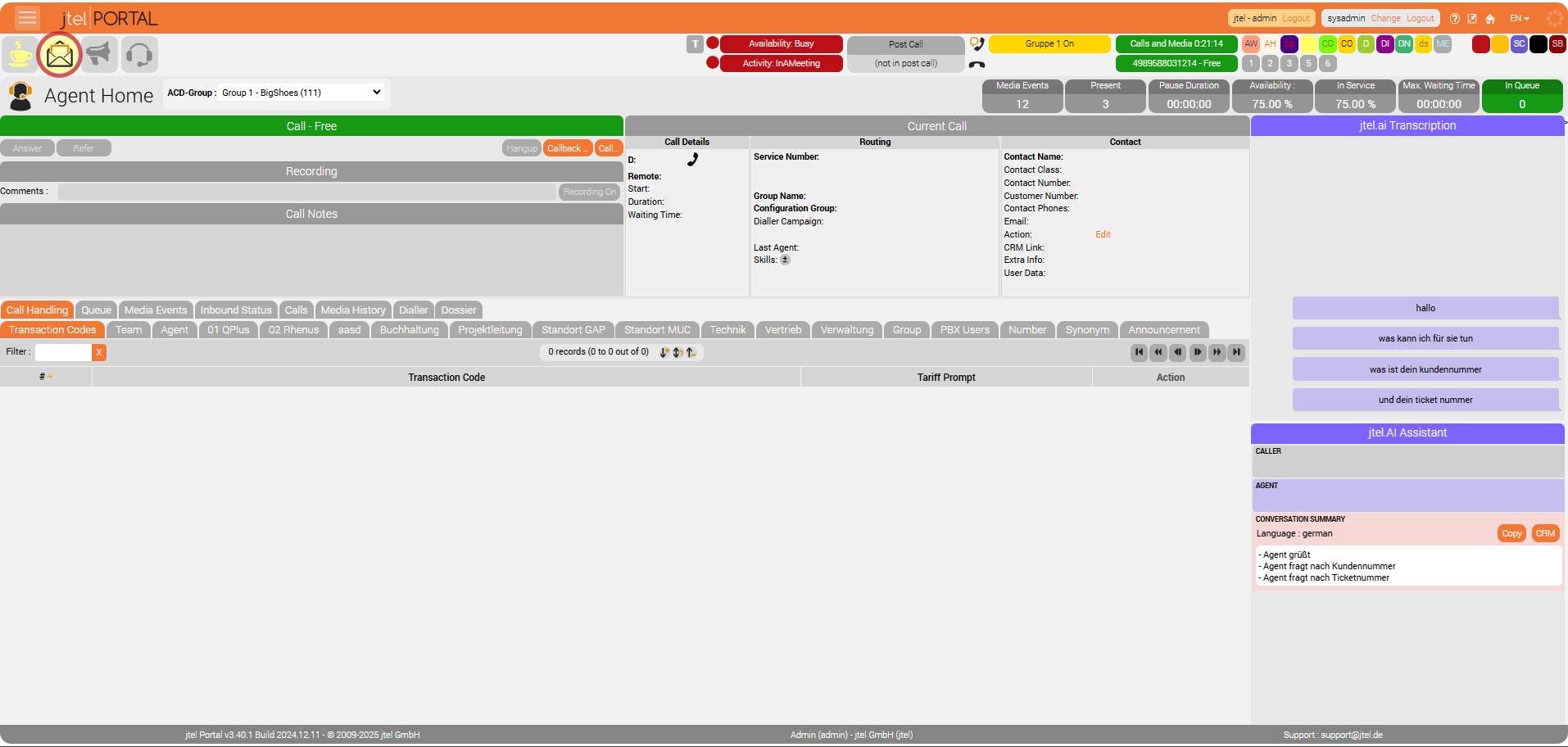
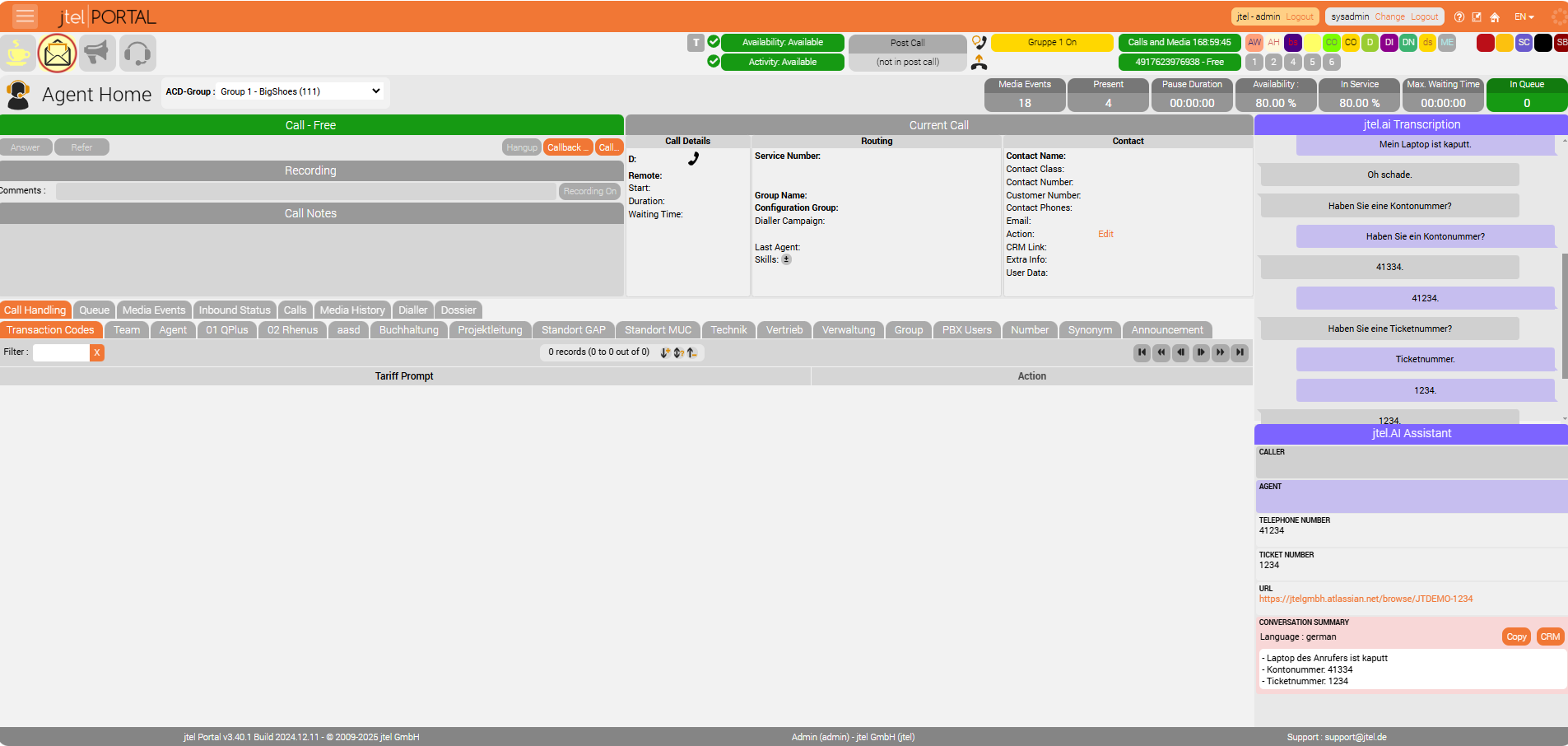
Displayed directly in Agent Home and Supervisor for both agents and supervisors.
...
A chain of AI modules can be attached to the transcription process, offering:
Sentiment Analysis: Detects emotions in conversations, displaying icons for happy, neutral, or angry tones.
Entity Extraction: Identifies useful data such as:
Automatic CRM or ticket system link generation based on customer or ticket numbers.
Suggested transaction codes related to the call.
Summary extraction at the end of the call.
- Transaction Code Suggestions: based on the conversation context.
- The AI can detect relevant transaction codes during the call.
- Suggested transaction codes are displayed to the agent in real-time.
- Sentiment Analysis*: Detects emotions in conversations, displaying icons for happy, neutral, or angry tones.
AI Pipeline Integration: Supports multiple AI models, including:
Microsoft Copilot
Existing chatbots
Custom AI solutions with REST API support.
Parallel AI Processing: Multiple AIs can process data simultaneously without delays.
...
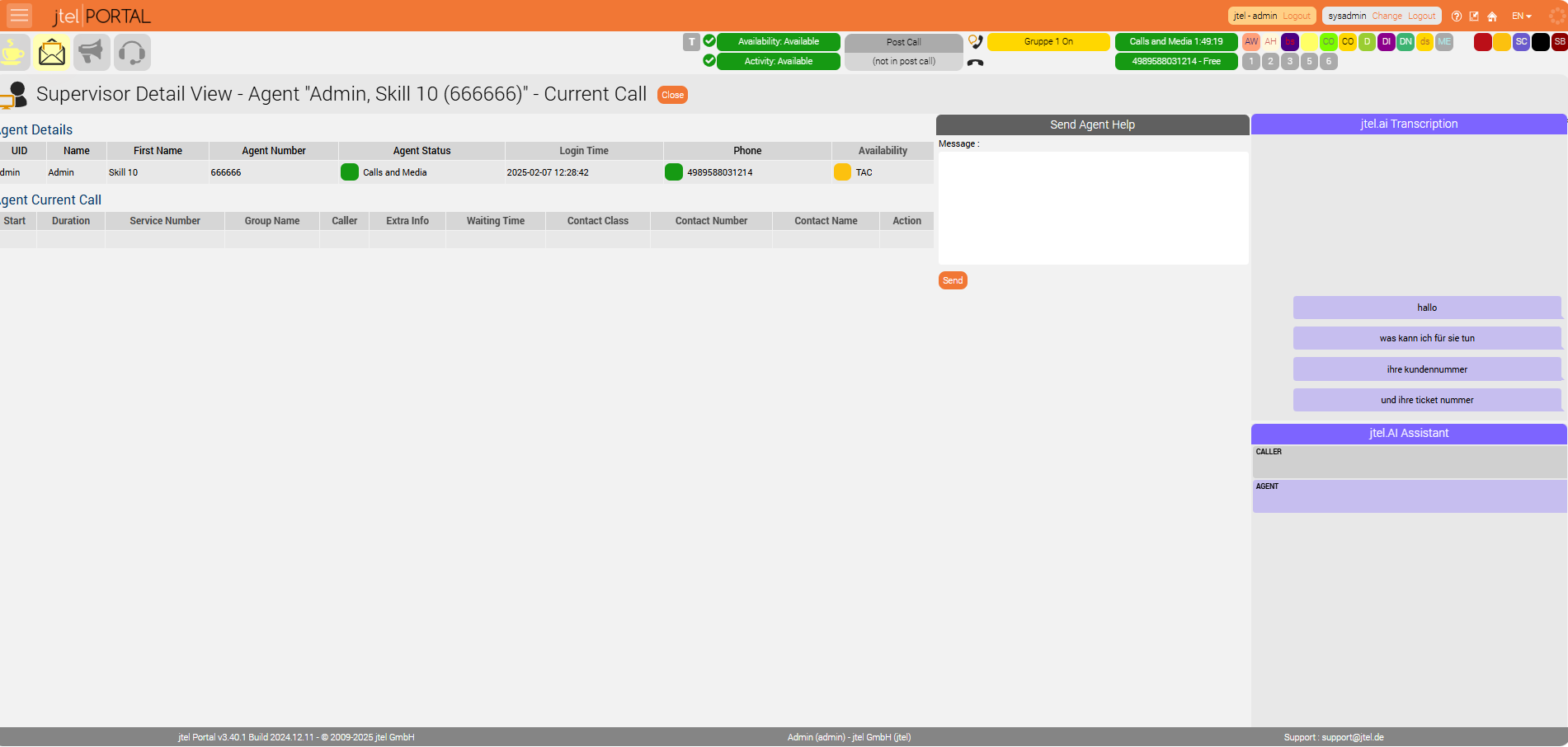
Supervisors can view live transcriptions.
Ability to send hints or comments to agents in real time.Supervisors can send direct messages to agents through the Supervisor Detail View.
Existing call listening and attachment features remain available.
AI-generated data (transcription, sentiment analysis, summaries) are stored in system statistics.
Data Storage & Retrieval
Transcriptions and AI-generated results are stored in the database for future reference.
Can be accessed in reports and statistical overviews.
...
They Can be assigned per role (Client Admin / Client User).
AI Service Rendering Control
It is possible to control the rendering (visibility) of individual Live Agent AI services via dedicated resources.
Each AI feature (Transcription, Assistant, Sentiment, Suggestions, etc.) has a separate permission resource.
| Resource | Description |
|---|---|
| Renders the AI Transcription section. |
portal.AgentHome.LiveAgent.AI.Assistant | Renders the AI Assistant services (Suggestions, Summary, Sentiment). |
portal.Acd.AgentHome.LiveAgent.AI.Assistant.Caller | Renders the caller's sentiment analysis. |
portal.Acd.AgentHome.LiveAgent.AI.Assistant.Agent | Renders the agent's sentiment analysis. |
portal.Acd.AgentHome.LiveAgent.AI.Assistant.Sugesstion | Renders the AI Suggestion section. |
portal.Acd.AgentHome.LiveAgent.AI.Assistant.Summary | Renders the AI Summary section. |
portal.Acd.AgentHome.LiveAgent.AI.Assistant.Satisfaction | Renders the AI Satisfaction section. |
portal.Acd.AgentHome.LiveAgent.AI.Assistant.TAC | Renders the AI Transaction Code section. |
Client Master Data - Parameters
In Client Master Data - Parameters. set AI Pipeline Configuration, After Call Pipeline Configuration and Transcription Provider
| Name | Value |
|---|---|
LiveAgent.AIPipeline.EndPoint | http://<server>:<port>/api/v1/aipipeline |
LiveAgent.AIPipeline.Input | { "endpoints": [ { "type": "suggestions", "url": "http://<server>:<port>/webhooks/rest/webhook", "input": { "sender": "%Service.StatisticsPartAID_%", "message": "$ai_pipeline_input" } }, { "type": "sentiment", "url": "http://<server>:<port>/api/v1/sentiment", "input": { "data": "$ai_pipeline_input" } } ]} |
LiveAgent.AfterCallPipeline.EndPoint | http://<server>:<port>/api/v1/aftercall |
LiveAgent.AfterCallPipeline.Input | { "endpoints" : [ { "type" : "summary", "url" : "http://<server>:<port>/api/v1/summary", "input" : $ai_pipeline_input } ], "respondTo" : { "host" : "%SERVER_IP_UDP_ADDRESS%", "port" : %ACD.UDP.Webserver.Port%, "message" : "NONCALL;AI_AFTERCALL_PIPELINE_RESULT;%QueueCheck.AgentDataID%;%Service.StatisticsPartAID_%;AI_PIPELINE_OUTPUT=$ai_pipeline_output" }} |
| # Instructions
|
| # Instructions
|
| # Instructions
|
| # Instructions
|
LiveAgent.Transcribe.Provider | EnderTuring.v2 (or Azure...) |
User Settings
Activate Live Agent functionality per user role:
...
This feature requires special activation by jtel.
Additional licenses may be required.
Contact jtel support for further details.
Example Interface
Agent Home View
Refer to the screenshot below for a visual representation of Live Agent in Agent Home.
Supervisor Detail View
Supervisors can see the agent’s current call, live transcription, and send direct messages to guide the agent during the call.
...
*Please note: Sentiment Analysis
Emotional states derived from conversation analysis (sentiment analysis) are considered ‘health-related data’. The use of artificial intelligence (AI) for sentiment (mood) analysis in telephone conversations in Germany is subject to one of the strictest and most complex legal frameworks in the world. The biggest legal hurdle arises from the actual purpose of the technology, determining the emotional tenor of a conversation. When an AI system recognizes and classifies emotions such as joy, frustration, fear or stress, it draws conclusions about the mental and psychological state of the speaker. This means that the processing falls into the most heavily protected data category of all. The path to lawful speech analysis is achieved through strategic planning and documented implementation in all areas, enabling a company to move from a position of high legal risk to one of reasonable compliance, thus enabling the innovative use of technology while preserving the fundamental rights to privacy and co-determination that are firmly anchored in German legislation.