| Sv translation | ||
|---|---|---|
| ||
In this TAB, a status-dependent change of the skill level for calls for the selected group can be added to the agent status.
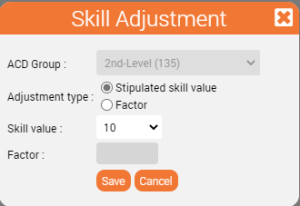
This is useful if setting an agent status is intended to ensure that an agent receives less calls because they are mainly supposed to work on something else when in this status. Example: When agents are in status Email Processing, you want them to receive less calls. If the skill level is reduced to 8 (instead of 80), the agent will only receive calls, when most other agents are not available - i.e. when the group is very busy. Use the Add button in the toolbar to create a skill correction. In the mask (pop-up), first select the group for which the correction is to take effect. Then specify the adjustment type, by selecting the radio button whether a fixed skill value (0-100) should be set or a factor (0-100).
When a factor is selected, the current skill of the group is reduced by the selected factor. Examples: Factor 1 causes no change, factor 0.5 halves the skill level, factor 0.1 reduces it to a tenth. So the factor is used to reduce the skill level. The following actions can be performed via the action button:
|

| Sv translation | ||
|---|---|---|
| ||
| Sv translation | ||
| ||
In diesem TAB kann dem Agentenstatus eine statusabhängige Änderung des Skill-Levels bei Anrufen für die gewählte Gruppe hinzugefügt werden.
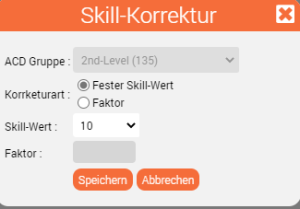
Dies ist sinnvoll, wenn durch das Setzen eines Agentenstatus erreicht werden soll, dass ein Agent kaum Anrufe bekommen soll, weil er im Hintergrund arbeiten soll. Beispiel: Wenn ein Agent im Status E-Mail-Bearbeitung ist, möchten Sie ihn von Anrufen entlasten. Bei einem reduzierten Skill-Level von 8 (statt 80) erhält der Agent in diesem Status nur noch Anrufe, wenn kein anderer Agent dafür gefunden werden kann, also "im Notfall". Über die Schaltfläche Hinzufügen in der Toolbar legen Sie eine Korrektur an. In der Maske (Pop-up) wählen Sie zunächst die Gruppe aus, für die die Korrektur greifen soll. Dann entscheiden Sie im Feld Korrekturart, durch die Auswahl des Radio Buttons ob ein fester Skill-Wert (0-100) eingestellt wird oder ein Faktor (0-100).
Bei Auswahl eines Faktors verhält es sich so, dass der aktuelle Skill der Gruppe um den gewählten Faktor reduziert wird. Beispiele: Faktor 1 bewirkt keine Änderung, Faktor 0,5 halbiert das Skill-Level, Faktor 0,1 reduziert ihn auf ein Zehntel. Der Faktor wird also genutzt um das Skill-Level zu reduzieren. Über die Aktions-Schaltfläche können folgende Aktionen durchgeführt werden:
|